Reverse DNS (rDNS) answers a different question than normal DNS: instead of "what IP does this hostname point to?", it answers "what hostname does this IP point to?" The mechanism behind it is the PTR (pointer) record, and mail servers check it as a basic sanity test that the machine sending mail is who it claims to be. Get it wrong and your outbound mail is far more likely to land in spam, even if your SPF, DKIM and DMARC records are perfect.
What is reverse DNS?
A normal (forward) DNS lookup takes a hostname like mail.example.com and returns an A or AAAA record with an IP address. Reverse DNS does the opposite: given an IP address, it returns a hostname via a PTR record. This mapping was defined in the original DNS specification (RFC 1035) and lives in special reverse zones rather than your regular domain's zone file.
You can check any IP or hostname's records with a DNS lookup tool — for reverse lookups specifically, most tools let you query the PTR record type directly against the IP.
How the in-addr.arpa and ip6.arpa zones work
Reverse DNS doesn't live under your domain. It lives under two special, IP-address-based zones that the DNS root delegates down through the numbering hierarchy:
- IPv4 uses
in-addr.arpa. The four octets of the address are reversed and appended to that suffix. So192.0.2.1becomes1.2.0.192.in-addr.arpa. - IPv6 uses
ip6.arpa(defined in RFC 3596). Each hex nibble of the 128-bit address is reversed and dot-separated, giving a much longer name with 32 labels.
Because in-addr.arpa is structured by octet, reverse zones are conventionally delegated at /8, /16 or /24 boundaries. If your ISP hands you a smaller block — say a /27 — plain in-addr.arpa delegation doesn't fit neatly. RFC 2317 ("classless in-addr.arpa delegation") solves this with a CNAME-based workaround so sub-/24 blocks can still get proper PTR delegation.
Why mail servers need a PTR record
Most receiving mail servers check the PTR record of the connecting IP as part of spam filtering. Two checks are common:
- PTR existence — does the sending IP have any PTR record at all? Missing PTR records are treated as a red flag by many spam filters, since legitimate mail servers almost always have one.
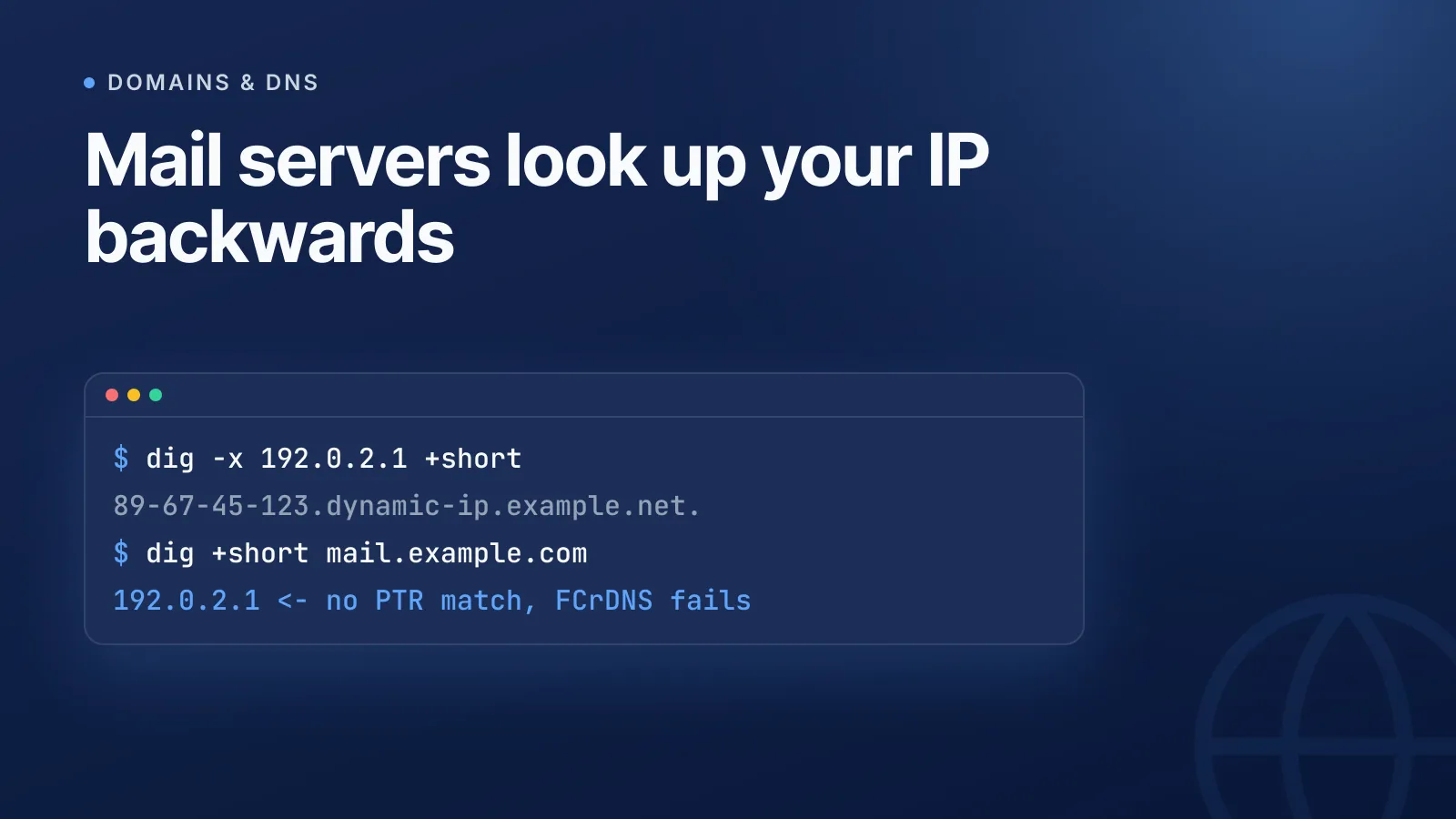
- Forward-confirmed reverse DNS (FCrDNS) — the receiving server takes the PTR hostname and does a forward lookup on it. If that forward A/AAAA record resolves back to the same IP, the identity is confirmed both ways. A mismatch, or a PTR that resolves nowhere, looks like spoofing.
A generic ISP-assigned PTR (something like 123-45-67-89.dynamic-ip.example.net) instead of a proper mail hostname is also a common signal that hurts sender reputation, even when it technically resolves. If you're chasing a deliverability problem, this sits alongside SPF, DKIM and DMARC as one of the first things to check — see why your emails go to spam for the fuller picture, and use the MX lookup tool to confirm your mail routing is correct at the same time.
TipBest practice is exactly one PTR record per IP, and it should match the hostname your mail server presents in its SMTP HELO/EHLO greeting. Multiple or mismatched PTR records make the FCrDNS check fail even when the mail itself is legitimate.
How to set a PTR record
Who controls your PTR record depends on who owns the IP address:
| Situation | Who sets the PTR |
|---|---|
| Cloud VM (AWS, GCP, Azure) | The provider, via a support request or a self-service reverse-DNS setting tied to your account |
| VPS/dedicated server | The hosting provider's control panel, or your account rep |
| Self-hosted with your own IP block | You, once your ISP or RIR delegates the reverse zone to your nameservers |
| Shared/dynamic ISP IP | Usually not possible — you don't control the address |
Cloud and VPS providers almost always assign a default PTR pointing to a generic, provider-branded hostname unless you configure a custom one. For a mail server, you want that PTR to point to the actual hostname the server identifies as, for example:
; Reverse zone: 2.0.192.in-addr.arpa
1.2.0.192.in-addr.arpa.  IN  PTR  mail.example.com.
And the forward side needs to match, so FCrDNS confirms both directions:
; Forward zone: example.com
mail.example.com.  IN  A  192.0.2.1
On a cloud provider you typically request this via their console or support ticket rather than editing a zone file directly, since you don't own the in-addr.arpa zone yourself — but the end result is the same PTR-to-A pairing.
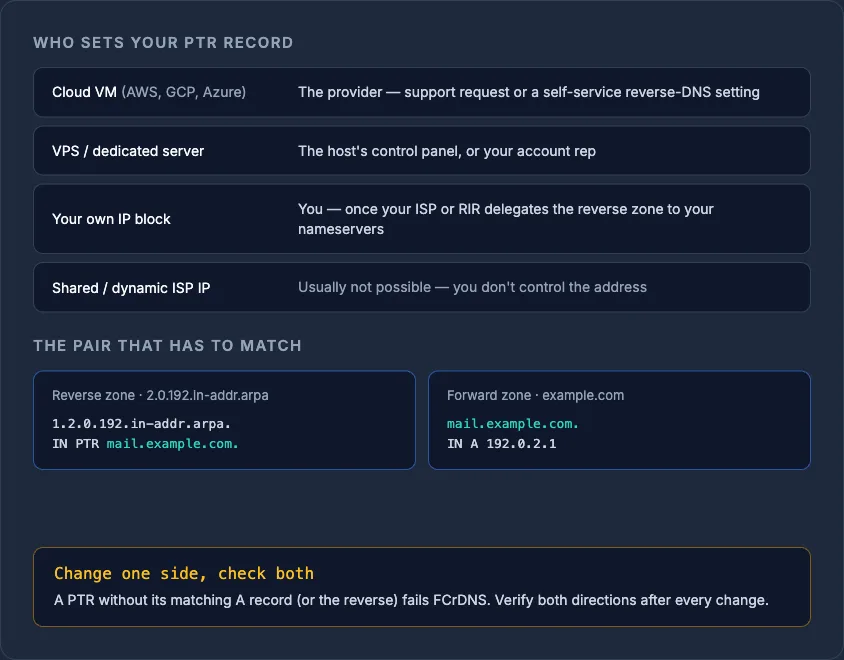
WarningSetting only the PTR without a matching forward A record (or vice versa) will fail FCrDNS checks. Always verify both directions after any change, and expect it to take some time to become visible everywhere — see DNS propagation explained if a lookup shows the old value.
Reverse DNS beyond email
Mail deliverability is the most common reason people ask about PTR records, but reverse DNS also shows up in:
- Diagnostics — traceroute and server logs resolve IPs to hostnames for readability.
- Access control — some older systems and network policies do rDNS-based allow/deny checks, though this is far less common than mail filtering.
- General network hygiene — a correctly configured PTR is one of the smaller checks worth including alongside SPF, DKIM, DMARC and CAA when auditing a domain's DNS posture; see 20 DNS security checks every domain should pass for the wider list.
Managing PTR records is usually a side effect of managing servers and mail across multiple providers, which is where things get messy — one host handles reverse DNS through a support ticket, another through a control panel toggle, and it's easy to lose track of which IPs actually have a matching PTR. InfraNest's DNS management keeps records, delegation and provider quirks visible from one dashboard so a missing or mismatched PTR doesn't sit unnoticed until deliverability drops.
Check any IP's current PTR record with the free DNS lookup tool before you troubleshoot further.
Frequently asked questions
#What happens if my server has no PTR record?
Many receiving mail servers treat a missing PTR record as a spam signal and may reject or quarantine mail from that IP, even if SPF and DKIM pass. Outside of email, a missing PTR mostly just means logs and diagnostics show a raw IP instead of a hostname.
#Can one IP address have multiple PTR records?
Technically yes, DNS allows multiple PTR records for one IP, but best practice and most mail filtering expect exactly one canonical hostname per IP. Multiple or inconsistent PTR records commonly break forward-confirmed reverse DNS (FCrDNS) checks.
#Do I need reverse DNS for a website that doesn't send email?
No — reverse DNS mainly matters for outbound mail servers and for network diagnostics. A web-only server with no mail sending has little practical need for a custom PTR record beyond whatever default your host assigns.
#Why can't I set a PTR record on my home internet connection?
Reverse DNS delegation follows IP ownership, and residential ISPs own the address blocks assigned to customers rather than delegating reverse zones to them. That's one reason mail servers running on dynamic home IPs are almost always flagged as high risk by spam filters.
Try it with a free tool
Was this article helpful?