

Set up InfraNest to grab a domain the instant it's released — no need to be at your keyboard when it happens.
#Overview
- Choose how InfraNest should try to catch a name when it drops: alert you, auto-register it, or back it up with a backorder service.
- InfraNest checks the readiness of a catch ahead of time, and again in the final minutes before the drop, so nothing fails for an avoidable reason.
- Once the name is yours, InfraNest can also set up its DNS, uptime monitor and certificate tracking automatically.
#Choose how to catch it
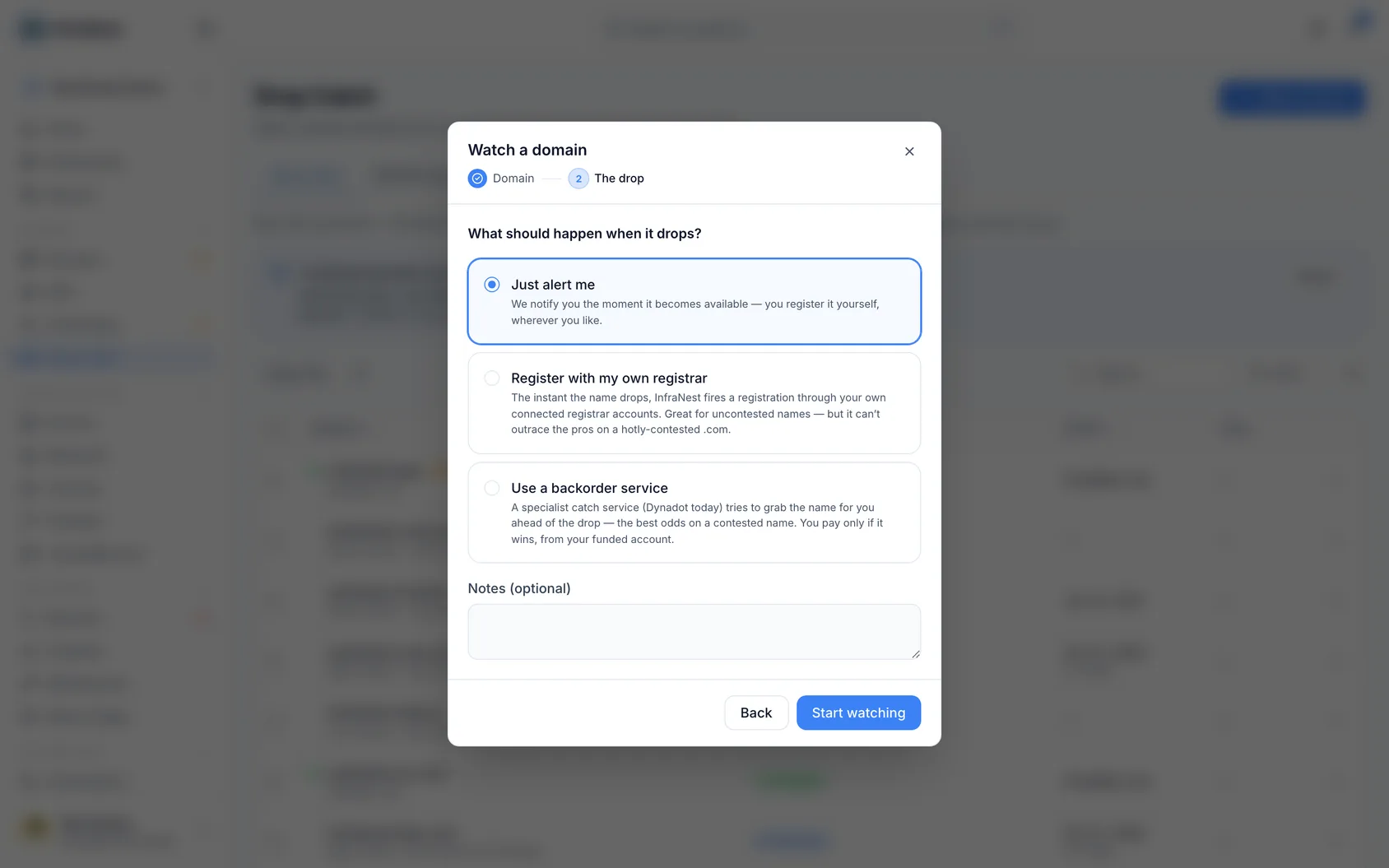
- On the add-watch screen (or later from Change strategy on the watch itself), pick one of three modes:
- Just alert me — you get notified the instant it's available and register it yourself.
- Register with my own registrar Pro — InfraNest auto-registers it through your connected registrar accounts.
- Use a backorder service Business — a specialist service (Dynadot) tries to catch it ahead of the drop. Best for contested names; you only pay if it wins.
#Register with your own registrar Pro
Open the watch, click Change strategy and choose Register it for me.
Choose your registrars in order — a target and one or more backups. If the first can't register it, InfraNest falls through to the next. Each registrar shows its standard price for the ending, first year and renewal, where it publishes one.
Your registrars appear straight away, and the price and availability for each ending fill in behind them as they arrive, so you can start ordering them before everything has loaded. A registrar that says Checking… hasn't answered yet. One that says Not checked couldn't be reached at all — that's about the connection, not the registrar, and you can still choose it. A registrar that genuinely doesn't offer the ending is moved to its own Not available list instead.
Pick the registrant contact to use, and fill in any extra details the domain ending requires. Some endings have rules about who may hold them —
.euneeds an EU/EEA registrant,.dean administrative contact with a German address — and InfraNest flags those on the tab.Check the catch-readiness panel — it's green when everything's in place, or shows a checklist of what's still missing.
#Ready for the drop
Every watch that registers or backorders a name has a Ready for the drop card on its page. It checks, together:
- the registrar that registers first sells the ending and its connection works;
- the contact is complete, and allowed to hold the ending (for example
.frand.euneed a registrant in the EU/EEA); - the registrar's standard price for the first year is under your spending limit (the name's own limit, or your workspace's);
- a backup registrar is set, to try if the first refuses;
- an armed registrar has enough credit to pay;
- your plan still includes this kind of catch;
- whether the name contains a well-known brand (a pointer, never a reason to stop).
- Click Check now to run it any time.
- InfraNest also runs it by itself about 10 minutes before the drop window opens, and if something would make the catch fail, you get an alert then — while there is still time to fix it — rather than after the drop. Each line that needs fixing links to where it is fixed.
When the domain drops, InfraNest confirms it's available, registers it, adds it to your domain portfolio, and logs every attempt.
In the last minutes before the drop, InfraNest checks the name every 30 seconds or so. Where a registrar is connected, it asks the registrar rather than the public registry lookup, because a registrar sees the release sooner. These checks use only a small share of your registrar account's request limit, so everything else you use that account for keeps working during the drop. If your registrar asks us to slow down, we wait longer than it asks.
#Once it is yours
A caught domain is set up the moment it lands in your portfolio, so it is never left bare. The Once it is yours card on the watch page lists what will happen:
- Turn on auto-renew — on unless you switch it off. A caught name is easy to lose a year later.
- Apply a DNS template — choose a template and the DNS account to host its zone. The zone is created there, the domain is pointed at it, and the template's records are added.
- Add an uptime monitor — once the domain's DNS points at a website. It counts towards your plan's monitors.
- Track its certificate — once the DNS points at your server, we keep an eye on the certificate it serves. Your server requests the certificate itself (with Let's Encrypt, for example); InfraNest does not issue certificates.
- Choose Change to set this for one watch.
- To set it for every watch, go to Settings → Cost & tax and change Once a caught domain is yours; a watch you have not changed follows it.
- Choose Use the workspace's default on a watch to go back to that.
After the catch, the card becomes Set up after the catch and says what came of each step. Something that couldn't be done — your plan has no room for another monitor, the template no longer exists, the registrar can't switch on auto-renew — is shown there and on the domain's own page, with the reason, so you can finish it yourself. A monitor or certificate waits up to a week for the site to come up, and then says it wasn't done.
#What the watch page tells you
The At the drop panel on the watch always says what will happen when the name is released: the mode you chose, the registrars in the order they'll be tried, and the contact the domain will be registered to. If it says We can only notify you, the catch isn't set up yet.
Above it, Expected drop is an estimate with a margin, not a fixed appointment — registries delete names in batches:
- in 12 days — the estimate is still ahead.
- Any time now — the moment has arrived and the name can be released at any point. We're checking at the shortest interval; nothing for you to do.
- Later than expected — it's past the whole estimated window and the registry still hasn't deleted the name. The watch keeps running, and eases off its checking rate as the estimate ages, tightening again the moment the registry status changes.
Next check says Due now when the check is queued and about to run.
#Why the wait is so different from one ending to the next
How long a name takes to become free after it expires is set by the workspace that runs the ending, and the answer ranges from days to months. A .es is gone about 10 days after it expires. A .com takes around 80. A .uk is 95. A .no is closer to 150 — five months of waiting on a name whose owner stopped paying on day one.
So a drop date that looks far away usually isn't a mistake, and one that looks close doesn't mean the owner only just let go. It's the ending's own timetable.
For most endings we hold the operator's published timings and use them. Where we don't, the watch says so — "We hold no confirmed deletion timings for .xyz, so this date is estimated from the usual timings" — and you should treat that date as a rough guide rather than a plan. Either way the watch keeps checking, and it checks hardest as the estimate approaches, so an estimate being a few days out doesn't cost you the name.
#Where the dates on the timeline come from
Only two of them are facts we read from the registry: Registered and Expired. The rest used to be arithmetic on the expiry date — and the biggest number in that arithmetic was a guess, because once a domain expires it is the registrar who decides when, in the following 45 days or so, to actually delete it. Nothing about the expiry date says which.
So when the registry tells us the date it deleted a name, we use that instead and measure everything after it from there. When that happens the watch says "The registry deleted it on 19 August, so the dates after Expired are measured from then rather than estimated from the expiry." That is the difference between a timeline you can check and one you have to trust.
If the registry ends up holding a name longer than our timings allow, the page says that too, rather than leaving a drop date sitting in the past as though it still meant something.
#Some endings auction a name instead of releasing it
On a few endings, the moment the registry lets go is not the moment you can register the name:
.ai— it enters a 14-day auction open only to registrars, at a price that falls each day. It reaches ordinary price at the end, and the watch tells you that date..caand.cz— the name is allocated at a scheduled registry auction. Only names nobody bids on come back to general availability, shortly afterwards.
The watch says so on the page, and it factors this into the odds rather than promising you a good chance at something that is going to auction. It also aims its final burst of checks at the moment a registration can actually succeed rather than at the auction opening.
#.uk is exact
Nominet publishes the precise second each pending-delete .uk name is released, so for those the watch shows their time rather than our estimate — no margin, because none is needed.
The record panel shows what the registry currently says about the name — including its status in plain words ("Pending delete", "No nameservers") rather than registry codes. Hover a status to see the original code if you need it for a support ticket.
#Place a backorder instead Business
- For a contested name, choose Use a backorder service and pick your connected Dynadot account.
- InfraNest places the backorder ahead of the drop; Dynadot does the catching and, if it wins, deposits the domain into your funded Dynadot account, which InfraNest then imports for you automatically. You only pay if the backorder wins.
NoteA backorder needs a connected Dynadot integration with funds in the account, and the Business plan.
#Which plan you need
| Free | Pro | Business and up | |
|---|---|---|---|
| Watch a domain and get an alert when it drops | ✓ | ✓ | ✓ |
| Register it here yourself, in one tap, once it is free | ✓ | ✓ | ✓ |
| We register it for you the moment it drops | — | ✓ | ✓ |
| Try every registrar at once (parallel racing) | — | — | ✓ |
| Backorder through Dynadot | — | — | ✓ |
If your plan doesn't include the way a watch is set to catch, it alerts you instead, and the watch says so — Alert only on your plan. Nothing is registered or charged until you upgrade.
#Register it yourself on the Free plan
On Free, InfraNest watches the name and alerts you the second it is free — then you register it. Every minute after the drop counts, so the watch's page helps you be quick:
- What happens at the drop ends with your step: You register it, here in InfraNest, in one tap from the alert.
- Be ready to register it yourself checks, before the drop:
- a registrar is connected and sells the ending — the one you register it through, from your own account there;
- a fast alert is on — a chat such as Slack or Telegram, or a person told in the app with push turned on. Email alone is often read too late. A destination set to urgent only counts: on a watch that only alerts you, the "it is free" message is sent as critical, because you have minutes to act on it;
- funds or a card at your registrar — InfraNest cannot see this, so it only reminds you. A failed payment loses the minute you won;
- the standard price for the ending at that registrar. Whether this one name is priced as premium only shows once it is free; we check the real price with your registrar before you buy.
- Let us register it for you compares the two: you, minutes after the drop, against a paid plan registering it within seconds, with a backup. Choose Register it for me under Set up auto-register now, and if you upgrade before the drop the watch switches over by itself. Until then it only alerts.
- Your alerts so far says how your earlier alerts ended — caught, yours, still free, or that someone else had it by our next check. It never says you would have caught a name: a contested name can be lost either way.
#Register it now
- Open the "it is free" alert — email, push, or chat — which links to a page built for your phone, showing the name, how long ago it became free, and the price at the cheapest registrar you have connected that sells the ending.
- Press Register it now: your contact and that registrar are filled in, so one more tap confirms it, and the domain is in Domains straight away.
- Prefer another registrar? Register through … instead is right below.
Before buying, InfraNest checks the live price of this one name with your registrar. If the registrar asks more than the price on the page — a premium name, say — nothing is bought, and you are told why. Your registrar charges your own account, as it would on its own website.
The same Register it now button is on the watch's page and on the Drop catch overview while the name is free.
No registrar connected yet? The page says Connect a registrar to register it here and lists the registrars we work with that sell the ending. Connecting takes about a minute, and you come straight back to the page with everything filled in.
On Free this works for names you watch, once they are free. Registering any other domain, and having it registered for you at the drop, are part of the paid plans.
#Alerts
You're notified at each key moment — dropping soon, available, went to auction, caught or failed — through your alert destinations (email, Slack, Telegram) and your outbound webhooks, so your own tools can react too.
The emails say where the watch stands, in your language:
- Dropping soon shows the stage it's in, when it's expected to drop (and whether the registry confirmed that time), and how it will be caught: registered for you, or an alert for you to act on.
- Caught tells you which registrar registered it, then suggests the next two steps: point it at your site and turn on the transfer lock.
- Renewed by its owner, sent to auction, not enough credit and couldn't read the registry each say what happened and what to do.
Slack, Teams and Telegram messages about a watch use the same words, in your workspace's language.
#Choose who hears about it
- On the watch's page, under Who hears about it, click Change strategy (on Free: Who to alert).
- Pick Chosen people and destinations:
- People in your workspace, each by email, in the app, or both. In the app reaches their phone or browser wherever they turned push on, and their own chats.
- Any of your workspace's destinations — a Slack channel, a Telegram chat, a shared inbox.
- Switch back to Your workspace's alert routing at any time.
Only those then hear about this watch: dropping soon, available, caught, failed and the rest. Use it for a name you watch for a client, or when one person on the team is the one who has to act. Every change is in the audit log.
All emails about one watch share one subject, such as northwyndr.io — drop catch, so your inbox stacks them into one conversation.
Dropping soon means the estimated drop is genuinely within about a week. It used to fire when a name entered the registry's pending-delete stage, which on some endings is still a month from the end — so on those you were told a name was dropping soon long before there was anything to do.
#If there isn't enough credit to pay for it
Registrars like Dynadot, Porkbun, Namecheap and Openprovider take the money from an account balance you top up in advance. If that balance is empty when the name drops, the registration is simply refused — and a drop only happens once.
So once the drop is close, InfraNest checks the balance of every registrar you armed the watch with against the price of that ending, and warns you if none of them can cover it. A balance that looks healthy in general can still be short for one particular ending: $30 is plenty for a .com and not enough for a .io.
You're only warned when none of your registrars can pay — if the first is short and a backup is funded, the catch still works, and there's nothing to do.
The watch page shows the same thing as a red panel with a link to top up. Top the account up before the expected drop, and the catch goes ahead as normal.
NoteWe stay quiet when we can't tell — a registrar that doesn't report a balance, one that bills a card instead of a prepaid balance, or an account with automatic top-ups switched on. No warning means "nothing known to be wrong", not "definitely fine".
The readiness check runs ahead of time so a catch never fails at the last second for a missing contact detail or required field. It tells you three different things, and only the first one stops a catch:
- Something is missing — an incomplete registrant contact, or a required field for the ending. Fix it before the drop.
- We couldn't check — your registrar didn't answer when we asked what the ending requires. Nothing is known to be missing, but the registrar can still refuse.
- A backup needs more — a backup registrar asks for details the target doesn't. Those fields belong to that registrar and can't be filled in from here, so if the catch falls through to it, it will fail. Reorder your registrars, or catch through the one you've filled in.
The prices shown are each registrar's standard rate for the ending, not a quote for this domain: a dropped name can be priced as premium by the registry, and taxes aren't included.
#If the name turns out to be premium
Just before registering, InfraNest asks your registrar for the live price. If the registrar says the registry has priced the name as premium, we don't register it — not there, and not at a backup either. A premium name can cost many times the normal rate, and nobody agreed to spend that.
Instead you get a Premium name alert with the first-year and renewal price, and a Register it yourself button. It is sent as critical, so it reaches destinations set to critical only too: the name is free, and only you can register it now. The watch stops registering by itself and goes back to alerting you, so if the price is worth it to you, register it from Domains → Add.
Some registrars, such as TransIP, never say whether a name is premium. A catch through one of those goes ahead at its normal price, as before, and the registration attempt on the watch page says the registrar didn't tell us.
#Your spending limit
When InfraNest registers a name for you, it never pays more than your spending limit for the first year without asking. The limit is about €50 until you change it under Settings → Cost & tax, in your workspace's currency. For a name worth more, set a limit for that domain alone in How we catch it on the watch.
At the drop, InfraNest compares the limit with the registrar's live price. If the name costs more, it isn't registered: you get an alert with the first-year and renewal price and a Register it yourself button — critical, like the premium one — and the watch goes back to alerting you. Your registrar is also told the most it may charge, so it can't bill a higher price than the one we checked.
TipSet a backup registrar on every watch you auto-register — if the first one refuses or has no funds, InfraNest falls through to the next automatically.
Was this article helpful?
Thanks for your feedback!
Thanks, this goes straight to the docs team.