

Drop-catch watches domain names you'd like to own, follows them toward expiry, scores how good they are and how likely they are to actually come free, and — if you choose — tries to grab them the instant they do. It's for anyone who wants a specific domain that isn't available today.
#Overview
- You add a Watch a domain for any name you want, with optional notes and tags.
- InfraNest tracks it through its expiry lifecycle and estimates when it will drop.
- Every watch gets two scores: domain quality (is it a good name?) and catchability (how likely is it to actually be released?) — each with a plain explanation.
- You're alerted at the moments that matter, and you choose whether InfraNest just tells you, registers the name for you automatically, or places a backorder with a specialist catch service.
#Find the Overview
The first time you open Drop Catch before watching anything, the Overview explains what happens to an expired domain and shows two ways in: Watch a domain or Find names that drop soon. It also shows what your plan allows, asks you to connect a registrar if you have none, and flags your own domains that have auto-renew off.
Once you're watching names, the Overview answers three questions:
- Does anything need me? — one card per watch needing action (name free now, premium price, not enough credit, checks failing, or not set up), each with the button to fix it.
- What drops next? — Where your watches are counts names by stage, Coming up lists everything expected to drop in the next 30 days, and Add drop dates to my calendar subscribes your calendar to those dates.
- How has catching gone? — How catching went covers the last 90 days: caught, renewed, auctioned or lost, with the reason for each loss and costs per catch.
Below this, Improve your chances lists changes worth making before a drop, each with its own action button.
The Discover tab lists names a registry has said it will release soon, best first, so you can watch one in a click or save the search for daily email matches. The Results tab holds the full catching history.
#Watch a name
- Open Drop Catch from the sidebar.
- Choose Watch a domain (or find one via Find names that drop soon or the Discover tab).
- Enter the domain name.
- Add Tags (optional) and Notes (optional) if you'd like.
- Choose how to catch it: Just alert me, Register with my own registrar Pro, or Use a backorder service Business.
- Select Watch to confirm.
NoteSome extensions (like
.nland.eu) can't be checked automatically unless you've connected a registrar that sells them. If none is connected, the watch is marked Needs a registrar until you add one in Integrations.
#Choose how to catch a name
When you add a watch, pick one of three approaches:
- Just alert me — you're notified the instant the name is available, and you register it yourself in one tap through your own registrar. Available on every plan, Free included.
- Register with my own registrar — InfraNest registers the name automatically through your connected registrar accounts (a target plus ordered backups) the moment it drops. Best for uncontested names.
- Use a backorder service — a specialist service (Dynadot) tries to catch the name ahead of the drop. This gives the best shot at a contested name. You only pay if it wins, from your funded account.
TipFor an uncontested name, your own registrar is usually enough. For a genuinely contested one, a backorder service gives you the better shot — check each watch's catchability score to decide.
#Resume a failed catch
- Open the watch from your Watch list.
- Sort out whatever caused the failure — for example, add funds, fix a contact detail, or connect a backup registrar.
- Open the ⋯ menu on the watch.
- Select Resume.
The watch goes straight back to watching and is checked again within a minute, using the same catch setup it had before. If the name is still free, an armed watch tries again automatically.
#Work with the watch list
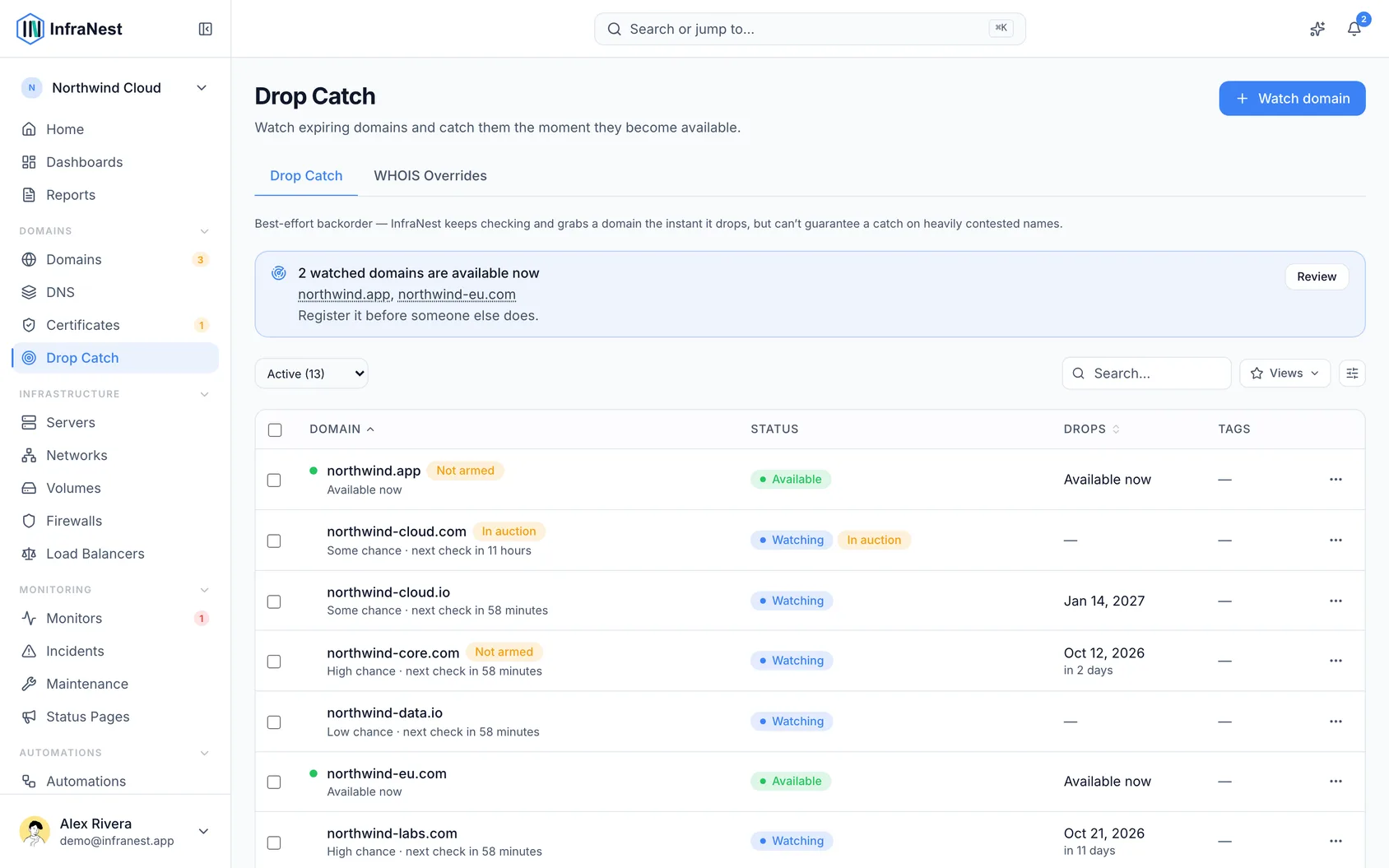
Your watched domains sit in one table, with columns for Domain (including its quality score), Where it is (its expiry stage), Expected drop, How we catch it, and Chances (Good, Fair, Slim, Bid only, or Yours to take).
- Use the chips above the table — All, Needs you, Drops within 30 days, In auction, Caught, Stopped — to filter the list.
- Use Search or Tags to narrow further.
- Open the ⋯ menu on any row for Edit tags, pause, resume, or Remove.
- Add Next check and Last checked as columns from Columns if you want to see them in the table.
WarningRemoving a watch deletes its check history and cancels any backorder already placed. If you only want it to stop looking for now, pause it instead.
#Understand auctions and releases
- Some expiring names go to a registrar auction instead of dropping — InfraNest flags these as in auction with a link straight to the listing, including price, bid count and end time where available.
- A few extensions (
.io,.ai,.ca,.cz) run their own release auction before a name becomes registrable again. Where the auction length is published (like.ai), the expected date reflects it; where it isn't (like.io), the watch says the expected drop isn't known yet rather than guessing. - You can't bid on your own behalf through InfraNest at these auctions — only registrars can — so you'll need a participating registrar if you want the name during the auction itself.
#Check a name's reputation
Each watch's page has an Is it a good name? card covering:
- History — years the name was a live website, and when first registered.
- Visitors — whether it's among the most-visited sites.
- The name itself — length, and whether a hyphen or digits make it harder to type.
- Scams and viruses — whether Google suspects the name of unsafe activity, with advice on what to do next.
- Spam — whether the name is on the URIBL spam list (only shown while we check it).
- Brand names — whether it contains a well-known brand, as a pointer rather than legal advice.
#Tips
- Watching a domain you already own works as a safety net if you let it lapse — but turning on auto-renew is the more reliable fix, since catching your own domain back is a race against professional drop-catchers.
- If the owner renews a watched domain, the watch stays active and you'll be told again if it heads for a drop another time. Routine yearly renewals that were never close to dropping don't trigger an alert.
#Troubleshooting
- Checks failing — this is usually on InfraNest's side, often because the registry limited lookups. Use Check now to retry, or Tell me when it is fixed to get a notification once checks resume.
- Not enough credit — the registrar you armed can't pay for the catch. The card shows what's needed and what the account holds, with a link to add funds.
- Not set up — the watch is set to register the name automatically but has no registrar chosen. Choose one, or switch the watch to Only alert me.
- Failed registration — if a registration attempt fails (registrar refusal, no credit, or someone else got it first), the watch shows Failed and stops checking automatically. Fix the underlying issue, then choose Resume from the ⋯ menu.
Was this article helpful?
Thanks for your feedback!
Thanks, this goes straight to the docs team.