

Find domain names that are about to become available again, before anyone else spots them — useful for anyone who wants a great domain without constantly refreshing a registrar's site.
#Overview
- Discover lists names the registry has officially said it will release soon.
- You can search by word, how soon the name drops, and its length.
- Each name gets a score to help you judge how good it is at a glance.
- You can watch a name in one click, or save a search to get new matches every morning by email.
#Search the drop list
- Open Drop Catch and choose the Discover tab.
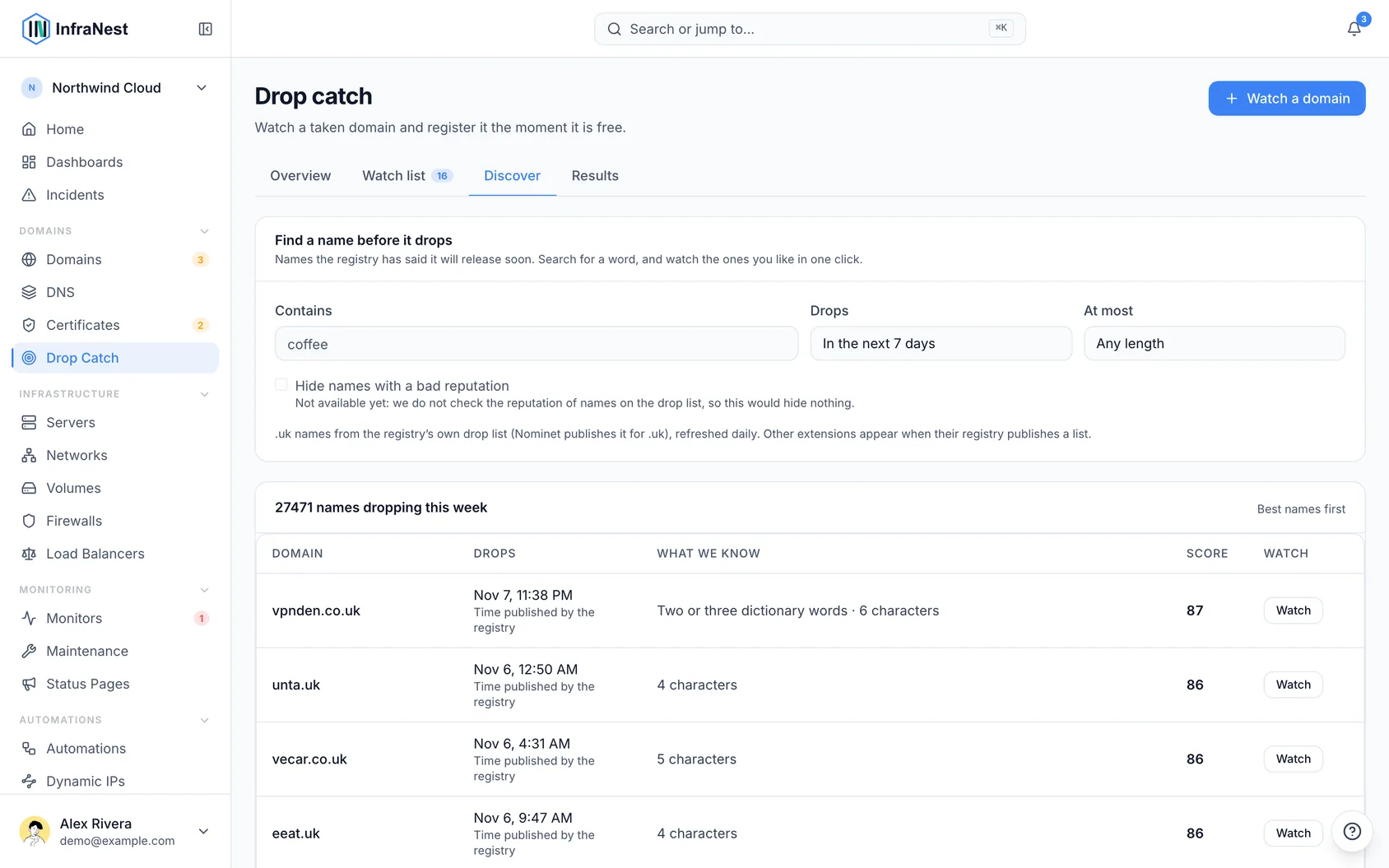
- Type a word in Contains — for example coffee. The list updates as you type.
- Choose when the names drop: Today, In the next 7 days or In the next 30 days.
- Choose At most to keep only short names, or Any length.
The best names come first. Each row shows:
- Drops — the day and time the registry will release the name. This is the registry's own published time, not our estimate.
- What we know — what the name itself tells us: whether it is a dictionary word (or two), whether it has a hyphen or digits, and its length.
- Score — how good the name is, from 0 to 100, based on its length, ending, how easy it is to say, and whether it is a sought-after word.
NoteHide names with a bad reputation is shown but switched off for now — we do not yet check the reputation of names on the drop list, so it would hide nothing.
#Watch a name in one click
- Choose Watch on a row.
- The name joins your watch list, and we tell you the moment it drops.
- To have InfraNest register it for you automatically, open the name in your watch list and choose how it is caught.
A watch from Discover counts towards your plan's watch limit, like any other.
#Get new names every morning
- Search for a word.
- Under Tell me when one appears, choose Save this search.
Each morning we email you the names that newly match it, best first, before they drop. A name is sent once, so the next email only has names you have not seen.
Your saved searches are listed under Saved searches:
- Open runs one again.
- Remove stops its emails.
TipTo stop all saved-search emails at once, switch off Discover: new names for a saved search in your notification settings.
#Which endings are covered
Today Discover covers .uk names (including .co.uk, .org.uk and the other .uk endings), from the list Nominet publishes every day. Other endings appear when their registry publishes a list of names it is about to release. We only use lists a registry publishes — never scraped or bought ones.
#What you search for stays yours
What you search for and watch stays private to you. We never use it to register names ourselves, and nobody else can see it:
- Your saved searches are yours alone — not even other people in your workspace see them.
- Our staff can't see what you searched for. Our audit log shows that a search was saved, never the word.
- Looking at a name in Discover tells no registry, and no one else, that you are interested in it.
Was this article helpful?
Thanks for your feedback!
Thanks, this goes straight to the docs team.