

This article is for anyone whose InfraNest monitor shows a site as down even though it opens fine in their own browser.
Overview
- Your browser and InfraNest's check often visit your site from different places and in different ways — so they can both be right, just seeing different things.
- This article shows you where to find out what the check actually received, and how to fix the most common causes.
Find out what the check saw
- Go to Monitoring and open the monitor.
- Look at the Current status card on the Overview tab. Under the status is one line saying what went wrong on the last failed check — this is the most useful clue on the page.
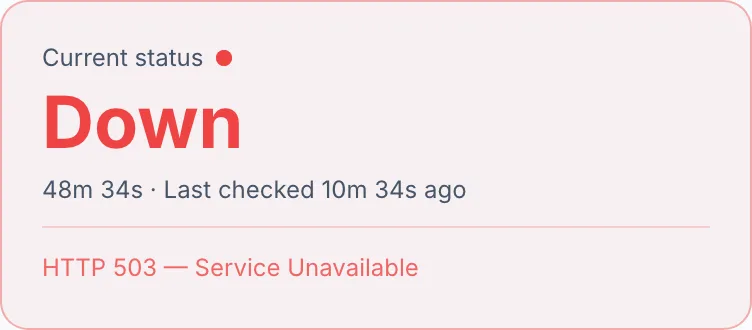
- Look at the Latest checks strip next to it. Each block is one check. Hover over a red block to see when it ran and from which region.
- Once you think you've fixed it, select Run now at the top of the page to check again straight away.
NoteThe alert email has more detail by region. Under Down from, Still up from and No reading from it lists which regions saw the failure and which didn't.
Understand the message and fix it
- "HTTP 403 (expected 200)" or "HTTP 503 (expected 200)": the site answered, but with an error code. This is the most common reason for a site that loads fine for you. Firewalls, bot protection and "under attack" modes often let a browser through but turn away an automated visitor like our check. Look in your firewall or CDN (Cloudflare, for example) for blocked requests at the times of the red blocks, and allow them. If the site is supposed to return that code, add it under Expected status codes in the monitor's settings.
- "Timed out — no response in time": the site didn't answer within the time limit. A page that's slow for you will also be slow for us. Raise Request timeout (seconds) under Advanced settings, up to 60 seconds.
- "Couldn't resolve the address (DNS)": the address doesn't point anywhere, as seen from our side. If you've just changed DNS, your own computer may still be using the old answer. See the article on DNS changes not showing up yet.
- "Connection refused" or "No route to the target from this location": our check couldn't reach the server at all. Often a firewall only allows certain countries or addresses, or the site has an IPv6 address that doesn't work properly. Try IP version → IPv4 only in the monitor's settings. If that turns the monitor green, the IPv6 setup on your server needs attention.
- "SSL certificate problem": our check didn't trust the certificate. Browsers sometimes quietly work around a missing piece of the certificate chain, but other software doesn't. See the article on certificate checks failing although the certificate looks valid.
- "Too many redirects": the page keeps sending visitors on to another address. Check your redirect rules, for example http to https and back again.
- "'…' is missing from the page": this is a keyword monitor, and the page loaded but didn't contain the text you asked for. Maybe the text changed, or the site showed a cookie wall, login page or error page instead. Update the keyword, or point the monitor at a page that always contains it.
Why a short blip doesn't page you
- If the connection never opens on the first try, the check tries once more straight away. An error or a slow answer isn't retried, because that answer is the result.
- One failed check doesn't raise an alert. Failed checks before alerting (2 by default) sets how many checks in a row must fail first. Raise it in the monitor's settings if a site that blips occasionally keeps alerting you.
- One good check ends the outage again.
Tips
TipWhen you check from several regions, each one checks on its own. A failure seen from one region counts as real, even if the others still see the site as up — a firewall that blocks one part of the world is a genuine outage for visitors there too.
- Slow answers mark the monitor as degraded, not down, when you've set a Slow response time alert.
Was this article helpful?
Related articles
You're asked to change your passwordIf InfraNest asks you to set a new password before letting you continue, nothing is wrong with your account — a policy in your organization has asked for it.TroubleshootingCommon "it's not working" situations and how to resolve them.A certificate check fails although the certificate is validThe padlock in your browser looks fine, but InfraNest flags the certificate, or an SSL monitor says it's down.My DNS change isn't showing up yetYou changed a DNS record and saved it, but your site, email or another service still behaves as if nothing changed.