

This article is for anyone who wants to tidy up their Domains list after a domain has expired, been transferred away, or otherwise stopped being theirs — and who wants to understand how that's different from cancelling a domain.
#Overview
- Archiving tidies a finished domain out of your Domains list without deleting anything — its costs, tags, notes and linked records are all kept.
- Archiving happens only in InfraNest and changes nothing at the registrar.
- To actually stop paying for a domain, turn off Auto-renew and let it expire, or transfer it away — that happens at the registrar, not here.
WarningInfraNest won't let you archive a domain that is still active. Archiving a live domain would hide something you're still being billed for, so if the domain is still active, InfraNest tells you so and points you at Auto-renew instead.
#When you can archive a domain
You can archive a domain once it is genuinely over:
- it has expired
- it was Transferred away to another registrar
- its registration Failed
- or it is No provider linked — for example because you disconnected the registrar it came from, so InfraNest can no longer keep it up to date
#Archive a domain
- Open your Domains list.
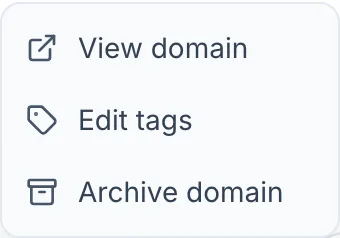
- On the domain's row, open the Domain actions menu and choose Archive domain. (You can also do this from the domain's own page, under Actions.)
- Confirm.
The domain leaves your list straight away. Nothing is deleted: its costs, Tags, notes, custom fields and any linked DNS zones or certificates are all kept.
#See your archived domains
- In the Domains list, open the status dropdown next to the Search box.
- Choose Archived. It appears there once you have at least one archived domain.
Every other view — All domains, Active, Expiring soon, Auto-renew off — shows only domains you still have, which is what makes archiving worth doing.
#Bring a domain back
- Open the Archived view.
- Open the domain, then choose Unarchive domain — either from the row menu or from the banner at the top of the domain's page.
You don't have to do this by hand in the common cases. If you register the domain again, or transfer it back in, InfraNest reuses the same record automatically — with all its history intact — and notes the change in your Activity history.
NoteA registrar sync on its own will never bring an archived domain back. Many registrars keep listing a domain during its redemption period, so InfraNest would otherwise un-hide domains you had deliberately put away. It waits for a real signal instead: you, a new registration, or a transfer in.
#Does an archived domain count towards my plan?
No. Archived domains do not use up your plan's domain allowance.
#What happened to "Delete"?
It has been replaced by Archive domain. Deleting only ever removed InfraNest's record of a domain — it never cancelled anything, so the domain stayed registered and stayed billed while vanishing from your list. Archiving does the part InfraNest can honestly do, and says what is true about it.
Was this article helpful?
Thanks for your feedback!
Thanks, this goes straight to the docs team.