

This article is for anyone who has deleted something in InfraNest by mistake and wants it back.
#Overview
- You have 14 days to restore most deleted items yourself — no support ticket needed.
- This covers Monitors, Automations, Dashboards, alert destinations, Maintenance windows, saved templates (automation, DNS and firewall), Tags, Roles, custom fields and Status Pages.
- Servers, domains, DNS zones and records, volumes and firewalls work differently — see What this doesn't cover below.
#Undo right after deleting
- After you delete something, a message appears in the corner with an Undo button.
- Click Undo and the item comes straight back, exactly as it was.
- Don't worry if the message disappears after about ten seconds — that isn't your only chance to restore it.
#Restore something deleted earlier
- Go to the page the item lived on and look for Recently deleted near the bottom:
- Monitors — the Monitors page, under the list of monitors.
- Automations — the Automations page, under the list of rules.
- Alert destinations — the Alerts page.
- Maintenance windows — the Maintenance page.
- Templates — under the list they belong to: automation templates in the Template library, DNS templates and firewall templates on their own pages.
- Status Pages — the Status Pages page.
- Tags, roles and custom fields — in Settings → Recycle bin, next to their own settings tabs.
- Dashboards — open the dashboard menu (the arrow next to the dashboard's name) and choose Recently deleted.
- If you don't see a Recently deleted section, nothing of that kind has been deleted recently — it only appears when there's something to restore.
- Can't remember where the item lived? Go to Settings → Recycle bin. It lists everything your team deleted in the last 14 days, whatever kind it is, in one place.
- Each entry shows who deleted it, when, and how many days are left.
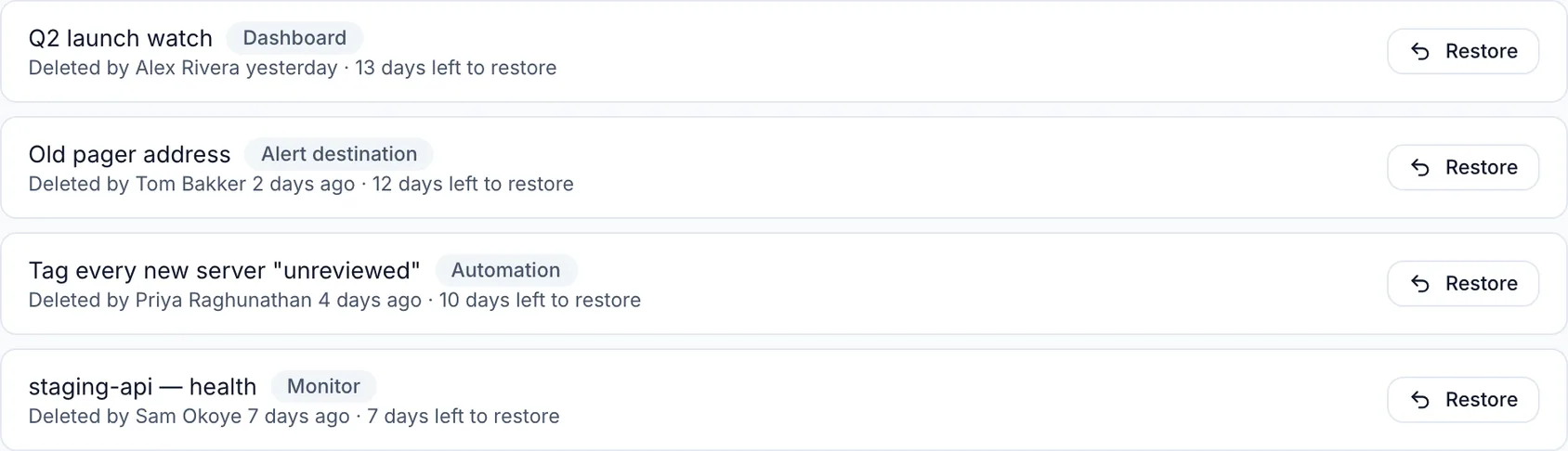
- Click Restore and the item returns with everything it had — a monitor keeps its history and settings, an automation keeps its steps, a dashboard keeps its widgets and layout.
WarningAfter 14 days, a deleted item is permanently removed and cannot be recovered.
#Tips
- A deleted monitor's open incident closes the moment you delete the monitor, and status-page subscribers aren't told it recovered. So a restored monitor doesn't count its time in the recycle bin as downtime — if it's still down when it comes back, its next check opens a new incident.
- Nothing runs while an item is deleted: a deleted monitor doesn't check anything, a deleted automation doesn't fire, and a deleted alert destination receives nothing. A deleted maintenance window stops holding alerts back, so alerts it was suppressing start coming through again. Restoring puts all of that back.
#Troubleshooting
- Restore button isn't working / item won't come back — Check whether you've hit your plan's limit for monitors or automations since deleting one; remove something else or upgrade first.
- A name that's been taken blocks the restore — Delete a tag called "prod" and create a new one with the same name, and the old one can't come back because the name is in use. Rename the new one first, then restore. The same applies to roles, custom fields, and a status page's web address.
- A role can't be restored — Restoring a role needs permission to manage roles, because a role is what grants access. Also note roles currently in use can't be deleted at all; members must be moved to another role first.
- Can't see a dashboard you deleted — Dashboards are personal. You'll only see your own deleted dashboards, and only you can restore them. Also, restoring a dashboard won't make it your default again if you set another one as default in the meantime.
- You don't have permission to restore — You need the same permission you'd need to delete the item. If your role can't delete monitors, it can't restore them either.
#What this doesn't cover
Servers, domains, DNS zones and records, volumes and firewalls aren't in Recently deleted. Those live in your provider account (Hetzner, Cloudflare, TransIP and so on) — InfraNest just shows you what's there.
- If one disappears from InfraNest but still exists at your provider, run a Sync integrations on that integration and it comes back.
- If you deleted it at the provider, restore it there instead.
TipTo prevent accidents with servers, domains and similar resources, turn on delete protection for the ones that matter.
Was this article helpful?
Thanks for your feedback!
Thanks, this goes straight to the docs team.
Still stuck? Contact support
Related articles
MaintenanceProMaintenance windowsSchedule a maintenance window so planned work doesn't page you. During the window, alerts are held back and affected checks show an "under maintenance" state…FirewallsFirewall templatesFirewall templates are reusable sets of firewall rules, so your servers can share a consistent, safe baseline.History & dataAudit logThe audit log records everything that happens in your workspace, so you can always see who did what and when.DeveloperUse InfraNest from an AI assistantAsk an AI assistant such as Claude, Cursor or VS Code about your infrastructure, and it looks the answer up in InfraNest for you.