

Give your status page a professional, branded web address — like status.example.com — with HTTPS handled for you automatically. This is for anyone who wants their status page to live on their own domain instead of InfraNest's.
#Overview
- Lets you host your status page at your own address instead of the default InfraNest one.
- InfraNest verifies that you own the domain, then sets up HTTPS automatically — no certificates to manage yourself.
- Works alongside DNS you manage elsewhere, or right inside InfraNest if that's where your domain already lives.
#Set up a custom domain
Open your status page, press Settings at the top, then pick Domain & SSL from the list on the left. Type the address you want to use.
InfraNest shows you two records to add to your domain's DNS:
- A CNAME record, which points your address at InfraNest.
- A TXT record on
_infranest-verify.followed by your address (for example_infranest-verify.status.example.com), which proves the domain is yours. Its value is the same for every status page in your workspace.
If that domain's DNS is already managed in InfraNest, choose Set it up for me instead — InfraNest adds both records for you, and the page tells you once they're in place.
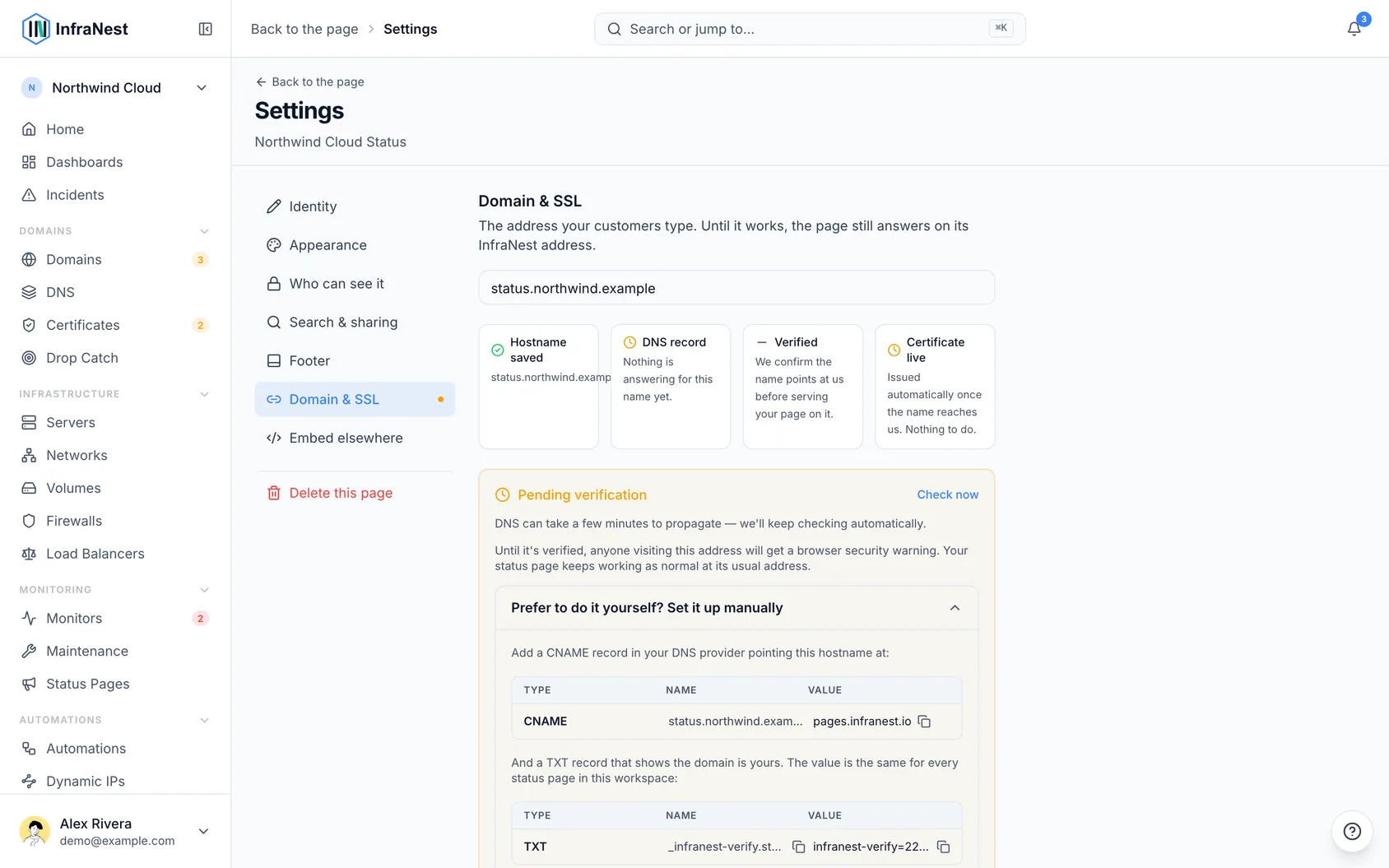
- InfraNest verifies the domain, and the page shows the progress. It keeps checking for two weeks, so a record that takes a while to appear still verifies on its own — even one marked as failed. After two weeks, press Check now; if one of the two records is still missing, the page tells you which one.
- Once verified, HTTPS is set up automatically. There's no certificate for you to manage.
NoteIf your DNS is managed in InfraNest, you can add the records right from the DNS module. Custom domains may be part of a higher plan.
#Why the TXT record?
- The CNAME record alone only says where your address points — not who it belongs to — and it can stay in your DNS even after you stop using it.
- The TXT record holds a value only your workspace is shown, so nobody else can put their own status page on your address, even if an old CNAME to InfraNest is still in place.
- Keep both records for as long as you use the address. When you stop using it, remove the CNAME too.
TipA domain that was already verified before this check existed keeps working — it doesn't need the TXT record.
Was this article helpful?
Thanks for your feedback!
Thanks, this goes straight to the docs team.