Cloud server bills rarely jump because of one big mistake. They grow a few euros at a time, from resources that keep billing long after anyone stopped using them — a stopped server, a disk nobody attached to anything, a snapshot from a box you deleted months ago, an IP address sitting unassigned. None of these break anything, so nothing alerts you. The invoice just creeps up.
This post covers the four places that creep comes from, why providers bill them the way they do, and how to read a cost report that actually shows you the leak instead of just the total.
Why cloud bills creep instead of spiking
A cloud invoice is really dozens of small meters running at once: compute, storage, IP addresses, data transfer, snapshots, load balancers. Stopping a server turns off one meter — compute — and leaves the rest running. A volume keeps billing per GB-month whether it's attached to a running instance or sitting idle. A snapshot keeps billing for its storage indefinitely, right up until someone explicitly deletes it. None of that shows up as a single suspicious charge; it shows up as a total that's 8% higher than last quarter for no reason you can name.
The four quiet costs
Idle servers. A server you stopped using but never deleted is still billed by the hour (or by the month, depending on provider) for existing — compute time doesn't care whether anything connects to it. The usual sign is a server with near-zero CPU and no inbound traffic for weeks.
Orphaned volumes. Block storage bills at the same per-GB rate whether it's attached to a server or not. Stopping — or even deleting — the instance it was attached to doesn't stop the volume's bill; only deleting the volume itself does. These show up with a status like "available" or "unattached" in your provider's own console.
Forgotten snapshots. A snapshot is a point-in-time copy of a volume, and its storage charge continues indefinitely — even after the source volume and the server it belonged to are both gone. Snapshots taken before a risky change are good practice; snapshots nobody ever goes back to delete are just rent on data you'll never restore.
Unattached IPs. A reserved or elastic IP address costs money specifically because it's unattached — providers price idle addresses to discourage hoarding scarce IPv4 space. We cover this one in detail, including how to find them, in find and clean up unused reserved IP addresses.
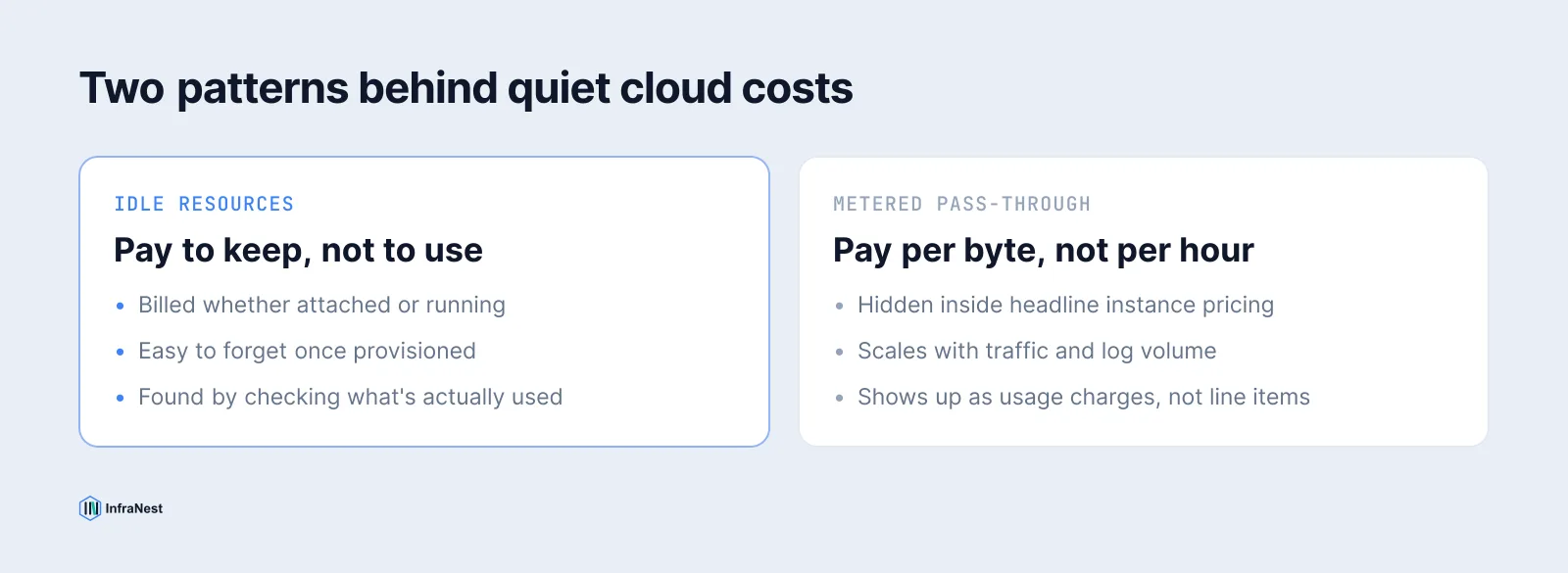
A second pattern: metered pass-through charges
The four costs above are all about things left provisioned. A second pattern is charges that scale with usage and never appear as a tidy per-instance-hour price: a load balancer's flat hourly fee keeps running even with zero live traffic; NAT gateways bill both an hourly rate and a per-GB data-processing fee, so busy outbound traffic gets charged twice; traffic between availability zones is often billed even though it looks "internal"; and log groups frequently default to keeping everything forever, so storage for logs nobody reads quietly grows every month. None of these are mistakes — they're the provider's actual pricing model — but they're easy to miss because the headline instance price never mentions them.
| Quiet cost | Why it keeps charging | Typical sign |
|---|---|---|
| Idle server | Billed by the hour regardless of use | Near-zero CPU, no recent connections |
| Orphaned volume | Storage bills per GB-month, attached or not | Status shows "available"/unattached |
| Forgotten snapshot | Storage accrues until explicitly deleted | Snapshot outlives its source server |
| Unattached IP | Idle addresses billed to discourage hoarding | Not attached to any resource or DNS record |
| Idle load balancer | Flat hourly fee regardless of traffic | Zero or near-zero registered targets |
TipAn address that's still referenced in a DNS record isn't "unattached" in any sense that matters — check DNS before you release anything, not just the provider's attachment status.
Reading a cost report across providers
The fix isn't checking each provider's billing console by hand every month — that's exactly the habit that lets this stuff accumulate in the first place. What you need is one report that pulls every priced item (servers, volumes, load balancers, IPs, certificates, domains) into one place, across every provider you use, and flags the ones doing nothing.
InfraNest's cost report does this by reading prices directly from your providers where it can, and showing per-month and per-year totals broken down by type, by provider, or by tag. A price of €0.00 counts as priced — it's a real answer. A blank price means nobody's entered a cost yet, and the report counts those separately so you can see what's missing.
From there, itemised costs gives you the line-by-line view behind that total: one row per resource, with its monthly and yearly cost. Filter by a tag or a custom field like Client, and the totals filter with it — useful if you're billing clients for the infrastructure you manage on their behalf. A volume attached to a server still gets its own row rather than being folded into the server's cost, so nothing is counted twice.
The part that actually finds the leak is on the Servers overview: a line like "6 things cost €48 a month and do nothing," with a Review savings button behind it. InfraNest checks six things specifically — idle servers, volumes attached to nothing, unassigned IP addresses, old snapshots, load balancers sending traffic nowhere, and servers running a size bigger than they need, judged against 30 days of actual peaks so a server that spikes to 90% every night at backup time isn't flagged for being quiet the rest of the time. Each finding shows its evidence and its cost. You choose Keep, it is needed, Ask me again in 30 days, or confirm the cleanup — nothing is removed until you press confirm, and every change lands in the audit log.
Here's roughly what that review list looks like in practice:
| Resource | Finding | Monthly cost |
|---|---|---|
| web-03 (stopped) | No traffic for 41 days | €4.80 |
| vol-data-old | Attached to nothing | €9.00 |
| snap-2026-03-12 | Source server deleted | €2.10 |
| 203.0.113.42 | Not attached, not in DNS | €3.60 |
| lb-staging | Zero registered targets | €12.00 |
On its own, each row looks trivial. Added up across servers at Hetzner, DigitalOcean and a couple of self-managed boxes, it's the difference between a bill that tracks what you actually run and one that just tracks what you forgot to delete. If you're weighing providers against each other on price in the first place, Hetzner vs DigitalOcean vs AWS is worth reading before you add a fourth account to track.
How often to check
Once is not enough — resources go idle continuously, not on a schedule. A monthly look at the cost report, grouped by provider, catches the drift before it compounds; a quarterly pass through Review savings catches anything that slipped past. If you're resizing servers based on this, make sure you're reading a full month of peaks rather than a quiet afternoon — how to read server metrics: rising trends vs one-time jumps covers the difference.
If you'd rather see this across your own accounts than take it on faith, connect your providers to InfraNest's cloud servers page and run a Review savings pass — it's usually the fastest way to find out what you're actually paying for.
Frequently asked questions
#Does stopping a server stop its bill?
No. Stopping a server turns off the compute meter but leaves its attached volumes, reserved IPs and snapshots billing as normal. You have to delete the resource itself, not just stop it, to stop paying for it.
#Why does an unattached IP address cost money?
Public IPv4 addresses are scarce, so providers bill idle reserved or elastic IPs at the same rate as attached ones specifically to discourage holding addresses you aren't using. Releasing ones that aren't referenced in DNS or attached to anything is usually free savings.
#How do I know if a snapshot is safe to delete?
Check whether the server or volume it was taken from still exists and whether you've restored from it recently. A snapshot whose source resource was deleted months ago is rarely needed, but confirm it isn't your only restore point before removing it.
#How often should I check for idle or orphaned cloud resources?
A monthly review of your cost report, broken down by provider or type, catches most of the drift before it adds up. A quarterly deeper pass through unattached volumes, snapshots and IPs catches what a monthly glance misses.
Try it with a free tool
Was this article helpful?