

Keep an eye on backup scripts, cron jobs and scheduled tasks that should run on a schedule — and get alerted the moment one silently stops running. This article is for anyone who relies on a job running regularly and wants to know if it doesn't.
#Overview
- Most monitors reach out to check on something of yours. A heartbeat monitor works the other way round: your job calls in to InfraNest each time it finishes.
- If the call doesn't arrive on time, InfraNest alerts you — this is the way to catch a job that stopped running silently.
- You can set this up automatically if the InfraNest agent runs on the server, or by hand for anything else, including GitHub Actions workflows.
#Watch a cron job on a server with the agent
If the InfraNest agent runs on the server, you don't need to set anything up by hand:
- Open the server and go to Workloads. Under Scheduled jobs you'll see every cron job and systemd timer on it — when each runs, as which user, and when it runs next.
- Next to a job of yours, select Watch this job. InfraNest creates the heartbeat monitor straight away, expecting the job as often as its schedule says, with an hour's grace for a nightly job.
- Change one line on the server: put
infranest-agent run --job "NAME" --in front of the command. InfraNest shows you the line before and after. For example:
# before
15 3 * * * root /opt/acme/backup.sh
# after
15 3 * * * root infranest-agent run --job "Nightly backup" -- /opt/acme/backup.sh
That's it. Your job runs exactly as before, as the same user, and exits with its own exit code. After each run the agent tells InfraNest when it started, how long it took and how it ended — no token goes in your crontab.
- When it fails, the monitor goes down and its page shows the exit code and the last 20 lines of the job's output, with passwords and keys masked. Add
--no-outputto send only the exit code. - When it doesn't run at all, the monitor goes down once the grace period has passed, as with any heartbeat.
- InfraNest never changes your crontab. The agent only reads it.
NoteInfraNest shows the whole line only if you have switched on command lines for the server, because cron lines often carry passwords. Otherwise it shows just the part to put in front of your command.
Your users' own crontabs aren't listed: only root can read them, and the agent never runs as root. Jobs in /etc/crontab, /etc/cron.d and the cron.daily, hourly, weekly and monthly folders are. A script in one of those folders, or a systemd timer, can't be wrapped this way — use the ping URL below instead.
If Scheduled jobs says the agent has no folder for job reports, run the agent's installer again with --upgrade; it creates the folder the reports go into.
If a maintenance window would start while a job is running, Scheduled jobs warns you and offers to move the window past it.
#Set one up by hand
- Go to Monitors and select Add.
- Choose Heartbeat / Cron monitor as the type.
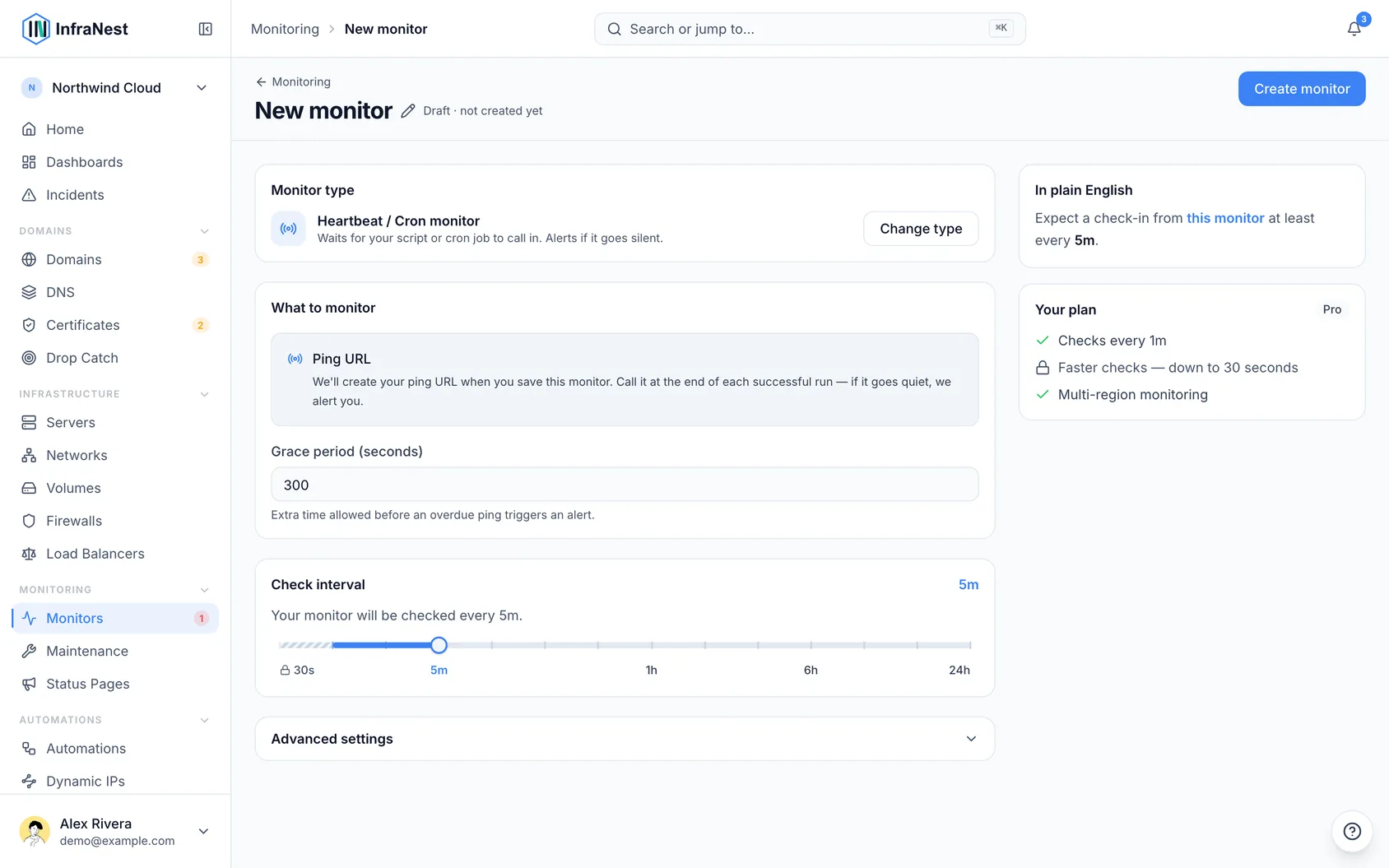
- Give it a name you'll recognise in an alert — "Nightly database backup" beats "job 1".
- Set the check interval to how often the job is supposed to run.
- Set a grace period — extra time InfraNest allows before calling it late. A backup that usually takes four minutes but occasionally takes eight needs a grace period comfortably longer than that overrun.
- Select Create.
You don't enter a URL for this type — InfraNest creates one for you when you save.
#Make your job check in
Open the monitor and you'll see its ping URL, plus a ready-to-paste one-liner. Add that line to the end of your script or cron job, so it only runs when the job actually succeeded:
0 3 * * * /usr/local/bin/backup.sh && curl -fsS -m 10 --retry 3 https://your-infranest-url/api/heartbeat/your-uuid
The && matters: it means the check-in happens only if the backup itself exited successfully. A failed job then stays silent, and silence is what raises the alert.
Use Copy rather than retyping the URL — the identifier in it is unique to this monitor.
#Report how long the job ran
Add ?duration= with the job's run time in seconds to the ping URL, and the monitor shows Last run took next to the last ping. A job that slowly takes longer each night is then easy to spot before it starts overrunning its grace period. For example, in a script:
start=$(date +%s)
/usr/local/bin/backup.sh && curl -fsS -m 10 --retry 3 "https://your-infranest-url/api/heartbeat/your-uuid?duration=$(( $(date +%s) - start ))"
Decimals are fine (?duration=4.25). If the value isn't a number, the check-in still counts — only the run time is left out.
#From a GitHub Actions workflow
If your backup, renewal or nightly sync runs as a scheduled GitHub Actions workflow, the same monitor works — the workflow calls in as its last step.
- In your repository on GitHub, open Settings → Secrets and variables → Actions and add a repository secret named
HEARTBEAT_URL, with the ping URL as its value. - Add this step to the end of the job:
      - name: Check in with InfraNest
        run: curl -fsS -m 10 --retry 3 "$HEARTBEAT_URL"
        env:
          HEARTBEAT_URL: ${{ secrets.HEARTBEAT_URL }}
GitHub skips the remaining steps once one fails, so the check-in only happens when everything before it succeeded — the same effect as the && above.
This also catches something GitHub doesn't tell you about loudly: in a public repository, GitHub switches scheduled workflows off after 60 days without any activity in the repository. The workflow stops running, nothing fails, and the missing check-in is what raises the alert.
TipGitHub can start scheduled workflows several minutes late when it's busy. Give the monitor a grace period that allows for that on top of the job's own runtime.
#What happens next
- Every check-in marks the monitor Active and records the time as its last ping.
- A brand-new monitor stays pending until its first window has passed, so you have time to wire the check-in up without being alerted about it.
- If nothing arrives within the interval plus the grace period, the monitor goes down and opens an incident, so your usual alert destinations fire.
- The next check-in resolves the incident and alerts you that it's back — you don't have to close it by hand.
#Tips
- Pausing a heartbeat monitor is safe: the ping URL keeps answering normally, so a job that's still calling it won't start reporting failures. InfraNest simply stops watching until you resume.
- Treat the ping URL as a secret. Anyone who has it can report your job as healthy — which would hide a real failure.
#Troubleshooting
- No ping received yet on the monitor means InfraNest hasn't heard from the job at all. Run the curl line by hand from the same machine: if that turns the monitor green, the problem is in your script, not here.
- If the machine can't reach the internet outbound, the check-in can't arrive — allow outbound HTTPS to InfraNest.
- A monitor that alerts every night at the same time usually has a grace period shorter than the job's real worst-case runtime.
Was this article helpful?
Thanks for your feedback!
Thanks, this goes straight to the docs team.