

A quick reference for anyone setting up or reading a check in InfraNest Monitors — this explains the ten kinds of checks you can run and how to read their results.
#Overview
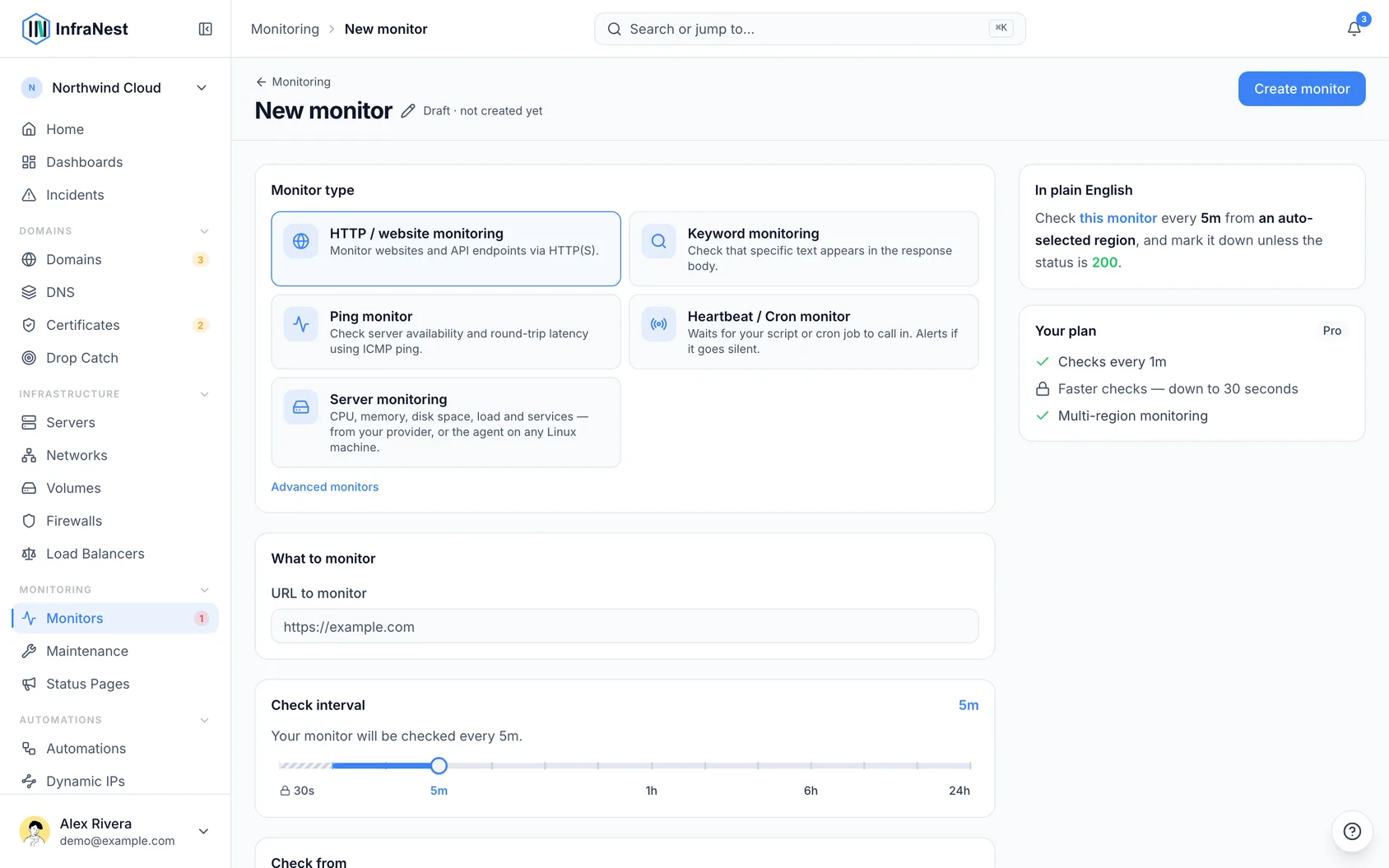
- InfraNest can watch ten different kinds of target. Pick the one that matches what you want to check.
- Each type looks for something different — a website loading, a certificate staying valid, a DNS record resolving, and so on.
- Some types (like SSL and DNS) give you extra detail on the monitor's page to help you understand why something failed, not just that it did.
#Monitor types
| Type | What it checks |
|---|---|
| HTTP | A website or URL is reachable and healthy (with slow-response detection). |
| API | A JSON API behaves as expected — one request, or a flow of up to five that signs in first and calls the API with the token. |
| Port (TCP) | A TCP port is open and accepting connections. |
| SSL | A certificate is valid and not near expiry — this also adds it to your certificate list. |
| DNS | A DNS record resolves, and optionally matches an expected value. |
| Keyword | A page contains (or doesn't contain) some expected text. |
| Redirect | A URL redirects to the address you expect. |
| Ping (ICMP) | A host answers a ping. |
| Heartbeat | A "dead man's switch" for cron jobs — your job must check in each interval, or you're alerted. |
| Third-party | Mirrors another company's public status page, so their outages show up in yours. |
TipFor an HTTP check you can also turn on an SSL sub-check to watch the certificate's expiry, without creating a separate SSL monitor.
#Read what a monitor shows when a check fails
- Open the monitor you want to look at.
- Review the last checks alongside the reason the check failed. What you see depends on the monitor type:
- Keyword — a short piece of what the page said instead of the expected text, plus how big the page was. A page that came back as "Down for maintenance" or a login screen explains the failure at a glance.
- Ping — how many replies were lost, and how much the reply times vary from one ping to the next. A few lost replies or a big spread usually point to a busy or unstable network rather than a host that is down.
- DNS — with more than one location, the answer each location got, with its TTL (how long resolvers may keep it). Locations can disagree because the name answers per region by design, or because a recent change hasn't reached every resolver yet.
- Redirect — every step the check followed, in order, with the status each one returned, so you can see where the chain went somewhere you didn't expect.
- API with steps — each request the check made, in order, with the status it got back and how long it took. Values a step saved or filled in are never shown.
- Heartbeat — how long your job ran, if its check-in reports it.
NoteThe page excerpt is kept small on purpose: at most 512 bytes of the page's text, only from checks that failed, with email addresses hidden. Like every individual check result, it is deleted after 3 days. Your uptime history keeps the counts and response times, never page text.
#Ask a specific nameserver for a DNS monitor
- Open the DNS monitor you want to adjust.
- Fill in Custom nameserver with the server you want it to ask instead of the default — a public resolver such as
8.8.8.8or1.1.1.1, or your DNS host's own nameserver, by address or by name. - Save the monitor. This is useful for checking what one particular server is handing out, for example right after you change a record.
The nameserver has to be on the public internet. An address on a private network, such as 10.0.0.53, 192.168.1.1 or 127.0.0.1, is refused when you save the monitor, and a name that points to one is refused when the monitor runs.
When the monitor goes down, it tells you which of these happened:
- didn't respond — the server did not answer within five seconds
- doesn't exist (NXDOMAIN) — the server answered that there is no such name
- returned an error — the server answered with an error, such as REFUSED when it will not answer questions about that domain
- no records found — the name exists, but has no records of the type you chose
#Set when an SSL monitor warns you
- Open the SSL monitor you want to adjust.
- Set Warn when expiring within (days) to how many days before expiry you want to hear about it — 30 is a sensible default.
- Save your changes.
Two things are worth knowing about how the warning behaves:
A certificate that is expiring soon does not turn the monitor red. The certificate still works, so the monitor stays up and no incident is opened — you get the expiry warning by email or your chosen destination, and the monitor's detail page explains what it found. Only a certificate that has actually expired counts as an outage. This matters most if the monitor is a service on a public status page: an upcoming renewal isn't something your customers need to see as a problem.
Certificates that renew themselves are judged differently. Most certificates today come from Let's Encrypt or a similar service, are issued for 90 days, and are renewed automatically at 30 days remaining — which means a perfectly healthy certificate briefly shows fewer than 30 days left on every single renewal. Warning you there would mean warning you every time the renewal worked.
So for those certificates we watch the renewal instead of the expiry date. You hear from us when the renewal should have happened and didn't — which is the thing you'd actually want to fix, and still leaves around 25 days to fix it. You can see whether a certificate is treated this way on the monitor's detail page, under Renewal. If we've got it wrong, you can correct it on the certificate itself in your certificate list.
Was this article helpful?
Thanks for your feedback!
Thanks, this goes straight to the docs team.