

Connect your AWS account to InfraNest so you can manage your Route 53 DNS, Route 53 domains, and ACM certificates all in one place. This is for anyone running DNS, domains or SSL certificates on AWS who wants to view and manage them from InfraNest.
#Overview
- Brings in your Route 53 hosted zones and records, your Route 53 registered domains, and your issued ACM certificates.
- You choose which of these three features — DNS, Registrar and Certificates — the connection is used for.
- InfraNest checks AWS about once an hour for DNS, domains and certificates, and refreshes each domain's details every six hours.
#Before you start
InfraNest needs access to your AWS account — an IAM role (recommended) or access keys — with permission to read and change Route 53, Route 53 Domains and ACM. See Set up AWS access for the steps, then come back with your role ARN or your keys.
#Connect it in InfraNest
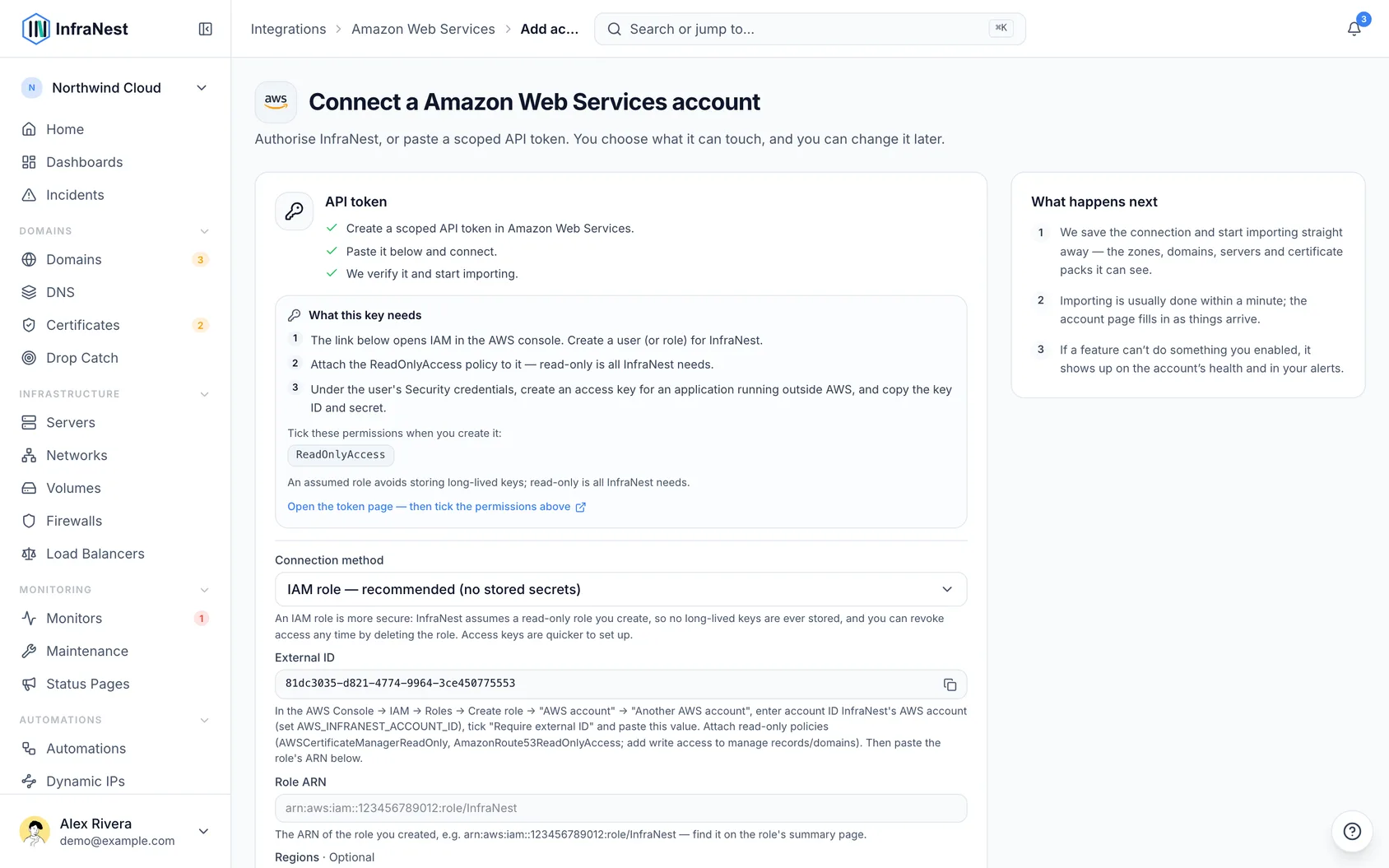
- Go to Integrations, open AWS and select Connect.
- Give the connection an Account label (optional). Leave it blank and it takes the provider's name — a second connection to the same provider becomes "… (1)", so they stay tellable apart.
- Choose which features to use it for: DNS, Registrar and Certificates.
- Under Connection method, choose IAM role and paste the Role ARN, or choose Access keys and paste the Access Key ID and Secret Access Key.
- Pick the Regions your ACM certificates are in. Leave it empty and only
us-east-1is checked. Route 53 is global, so DNS and domains don't depend on this. - Select Connect.
NoteReading your AWS account is enough to see your lists, but every change you make from InfraNest — adding a record, renewing a domain, and so on — needs write permission too.
#What you get once it's connected
- DNS (Route 53) — your public hosted zones and their records. Add, edit and delete records, and create or delete zones.
- Domains (Route 53 Domains) — register, transfer in and renew domains, get the transfer (EPP) code, change nameservers and contacts, lock transfers, and turn WHOIS privacy and auto-renew on or off. DNSSEC keys can be added to the domain at the registry.
- SSL certificates (ACM) — your issued ACM certificates appear in your certificate list, with their expiry dates, so they're covered by your expiry reminders.
#What it can't do
- No EC2 servers. AWS covers DNS, domains and certificates only.
- Private hosted zones (the ones attached to a VPC) aren't imported — only public zones are.
- Alias records are shown but can't be edited here. Change them in the Route 53 console.
- Only issued certificates come in. A certificate still waiting for validation, or one that failed, doesn't appear.
- Signing a Route 53 zone with DNSSEC is done in the Route 53 console. What InfraNest does is add the DNSSEC key to the domain at the registry.
- Some country-specific domain endings need extra details; InfraNest supports a curated set and shows a clear message for the rest.
#Troubleshooting
- Your records show, but every change is refused — the role or user only has read access. Give it the write permissions listed in Set up AWS access. Reading is enough for the lists; every change you make from InfraNest is a write.
- "Access denied" right after connecting — for a role, check the trust relationship allows InfraNest's account and that Require external ID has exactly the External ID InfraNest showed you.
- One feature shows as paused — AWS refused it twice, for example domain pricing. Add the missing permission, then select Re-enable now on the AWS page under Integrations.
- A certificate is missing — make sure its region is selected on the connection, and that it is issued in ACM.
TipIf you manage more than one AWS account, give each connection its own Account label so you can tell them apart at a glance.
Was this article helpful?
Thanks for your feedback!
Thanks, this goes straight to the docs team.
Related articles
 CloudflareConnect CloudflareConnect Cloudflare to manage your DNS, domains and SSL certificates from InfraNest. Your Cloudflare zones and records appear automatically once it's connected.CloudflareCreate a Cloudflare API tokenTo connect Cloudflare, InfraNest needs an API token from your Cloudflare account. Here's how to create one with the right permissions.
 DigitalOceanCreate a DigitalOcean API tokenYou only need this if you'd rather not use Connect with DigitalOcean, which does the same job without a token. If you do want one, it takes about a minute.
 DynadotCreate a Dynadot API keyInfraNest talks to Dynadot with an API key and a signing secret. Here's how to create them.