

Connect your GoDaddy account to InfraNest to manage your domains and DNS in one place, without needing to log into GoDaddy for everyday changes.
#Overview
- Lets you view and edit DNS records for your GoDaddy domains.
- Lets you register, transfer in, renew and manage domains directly from InfraNest.
- Keeps your domains and DNS automatically up to date, so you rarely need to check GoDaddy itself.
#Before you start
You'll need a GoDaddy personal access token. See Create a GoDaddy access token for the steps — and for GoDaddy's API access limits, which can affect some features.
#Connect GoDaddy
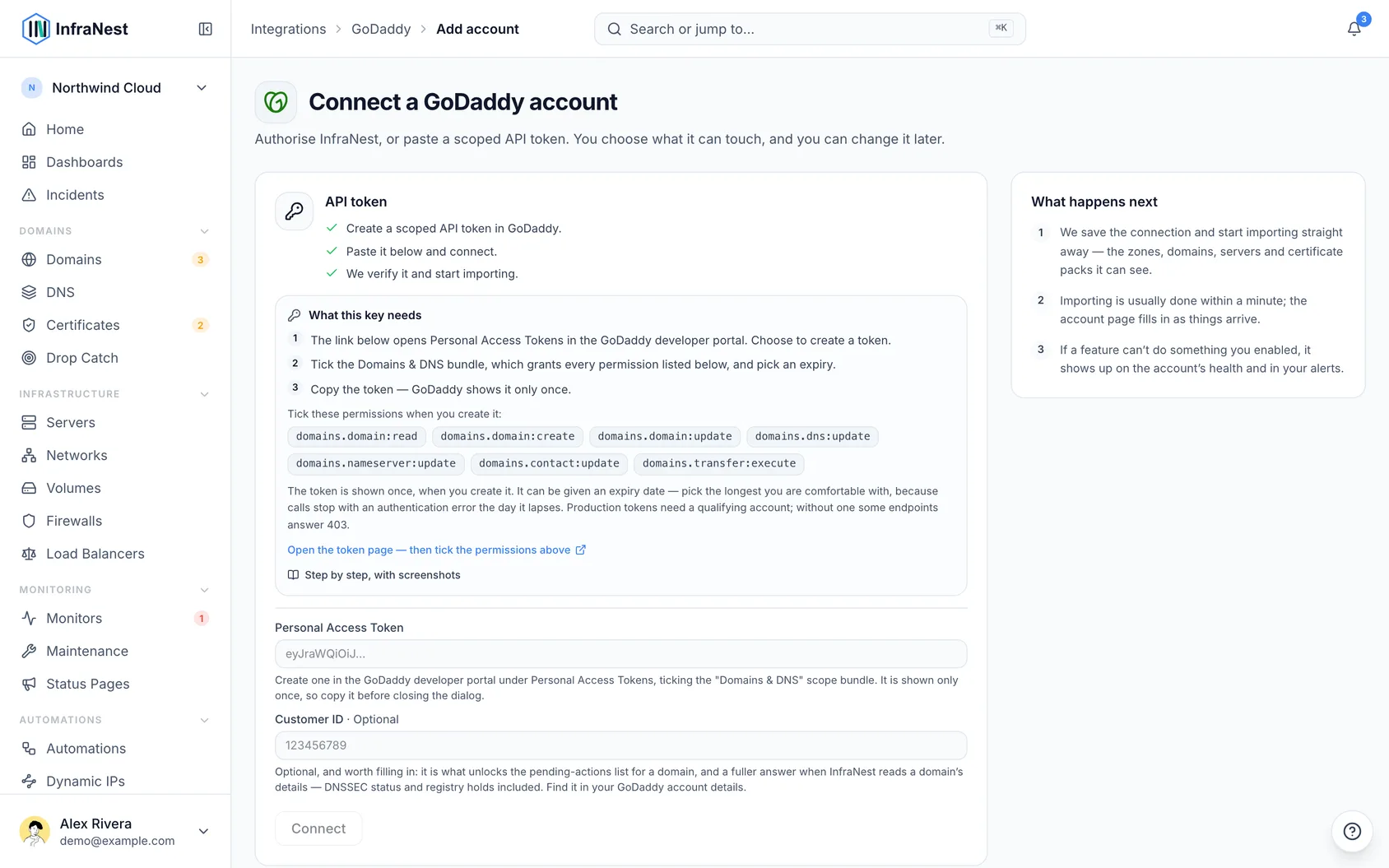
- Go to Integrations and open GoDaddy.
- Give the connection an Account label (optional). Leave it blank and it takes the provider's name — a second connection to the same provider becomes "… (1)", so they stay tellable apart.
- Choose which features to use it for: DNS and Registrar.
- Paste your Personal Access Token.
- Optionally fill in your Customer ID, from your GoDaddy account details. It lets InfraNest show a domain's pending actions (and cancel one), its DNSSEC status and any registry holds.
- Leave Email me when this integration has problems ticked if you'd like email warnings.
- Select Connect.
NoteOlder connections used a GoDaddy API key and secret instead of a token. GoDaddy stops accepting those at the end of 2026 — if yours still uses one, it keeps working and shows a reminder on its page. Paste a personal access token into the connection to switch over.
#What you get once it's connected
- DNS — view and edit records for your active GoDaddy domains.
- Domains — register, transfer in, renew, get the transfer (EPP) code, manage nameservers and contacts, lock transfers, and turn WHOIS privacy and auto-renew on or off. GoDaddy tells InfraNest which extra details each domain ending needs, so the registration form asks for exactly those.
InfraNest refreshes your domains and DNS about once an hour, and each domain's details every six hours.
#What it can't do
- No certificates. GoDaddy's API doesn't list SSL certificates.
- No DNSSEC changes. With a Customer ID, InfraNest can show whether a domain is signed, but adding or removing DNSSEC keys is done at GoDaddy.
- DNS only for domains registered at GoDaddy, and zones can't be created or deleted here — a zone comes with the domain.
- WHOIS privacy may need GoDaddy's own privacy product on the domain before it can be switched on.
#Paying for domains
Registering, renewing or transferring a domain in from InfraNest charges the payment method on your GoDaddy account. It needs one on file, or a funded Good as Gold balance — otherwise the purchase is refused before anything is registered, and InfraNest tells you so.
If your GoDaddy billing address is in the EU or the UK, card payments cannot be completed through GoDaddy's API at all: European payment rules require a verification step their API has no way to show you. Two ways around it, both fine:
- Fund a Good as Gold balance at GoDaddy and let purchases draw from that, or
- Buy the domain in GoDaddy's own screens. InfraNest picks it up on the next sync and everything else — DNS, nameservers, contacts, locks — keeps working as normal.
Renewals are not affected. Leave auto-renew on and GoDaddy charges those itself, on its own schedule, without going through the API. You can switch auto-renew on or off from InfraNest, which changes a setting rather than paying for anything.
#Troubleshooting
- "Authentication failed" — the token has expired, was deleted, or was pasted incompletely. Make a new one, open the account's Account tab and paste it in with Update the API key.
- Some features show as paused — GoDaddy limits API access to certain features depending on your account. InfraNest marks them as paused and retries automatically. See Create a GoDaddy access token for details.
Was this article helpful?
Thanks for your feedback!
Thanks, this goes straight to the docs team.
Related articles
 AWSConnect Amazon Web Services (AWS)Connect AWS to manage your Route 53 DNS, Route 53 domains and ACM certificates from InfraNest.
 CloudflareConnect CloudflareConnect Cloudflare to manage your DNS, domains and SSL certificates from InfraNest. Your Cloudflare zones and records appear automatically once it's connected.CloudflareCreate a Cloudflare API tokenTo connect Cloudflare, InfraNest needs an API token from your Cloudflare account. Here's how to create one with the right permissions.
 DigitalOceanCreate a DigitalOcean API tokenYou only need this if you'd rather not use Connect with DigitalOcean, which does the same job without a token. If you do want one, it takes about a minute.