

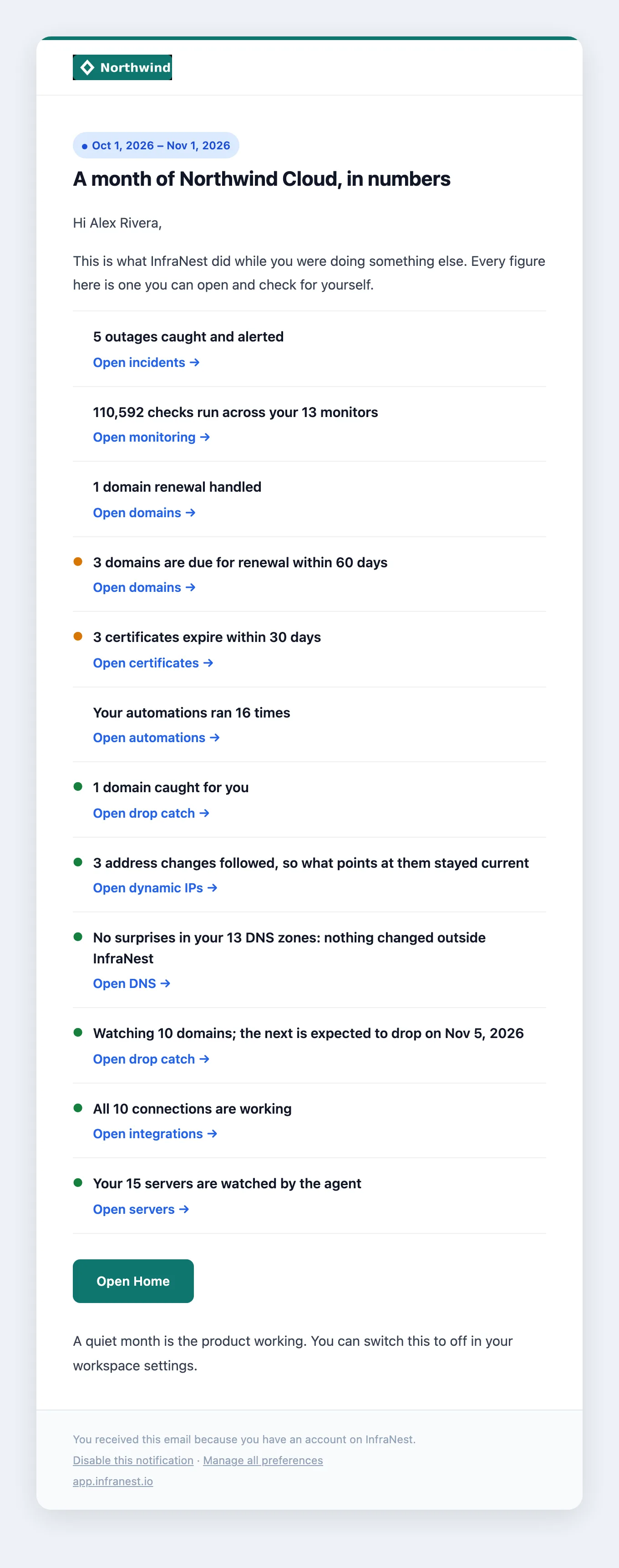
The monthly recap is an automatic email that sums up what InfraNest did for your workspace over the last billing period — useful for anyone who wants a quick check-in without digging through every page.
#Overview
- A short, workspace-specific summary, not a newsletter — it arrives whether the month was busy or quiet.
- Each line links to the real page it's about, so every figure is one you can open and check yourself.
- It covers what happened, good news (things that stayed fine), what's coming up, and at most two next steps.
- You'll never see a list of zeros — a zero is either good news, a next step, or left out entirely.

#What's in it
- What happened — checks run, outages caught, domain renewals handled, DNS changes spotted at a provider, automations that ran, and domains Drop Catch caught for you.
- Good news — if nothing went wrong somewhere you use, it says so, like "No outages: all 7 monitors stayed up" or "No surprises in your DNS".
- What's coming up — domains or certificates due for renewal soon, and when the next watched domain is expected to drop.
- A next step (at most two) — if part of InfraNest isn't set up yet, such as your first monitor.
#Know when it arrives
- It lands with your billing period, not on the 1st of the month — if your billing month starts on the 14th, your recap arrives just after the 14th.
- It goes to the workspace owners automatically.
- Anyone else can turn it on for themselves: go to My account → Notifications, find the Workspace digests group, and switch on Monthly recap.
NoteA quiet month still gets a recap on purpose — if nothing broke, that's the news worth reading.
#Turn off the recap for your whole workspace
- Go to Settings → Emailed reports.
- Find Monthly recap.
- Turn it off. You'll need to be an owner or admin to do this — it stops the recap for everyone in the workspace.
#Turn off the recap just for you
- Go to My account → Notifications.
- Open the Workspace digests group.
- Switch off Monthly recap.
- Alternatively, use the unsubscribe link at the foot of the email — it does the same thing and also covers the in-app notification. Everyone else keeps getting theirs.
#Tips
TipOn an annual plan, you get a different email instead: a summary of the whole year, sent 30 days before your renewal, so there's still time to act. It gives you the renewal date and links to your billing page for the amount, rather than printing a figure that might not match your invoice.
- The monthly recap is available on paid plans.
- Changing the setting takes effect from your next billing period — it won't resend one you've already received.
Was this article helpful?
Thanks for your feedback!
Thanks, this goes straight to the docs team.
Still stuck? Contact support
Related articles
Notifications"The bell: your notifications inbox"The bell at the top of every page is where InfraNest tells you what needs you. It is organised by what still needs doing, not by what you've read: a broken…NotificationsGet notifications on your phoneInfraNest can alert you on your phone when something urgent happens, such as a monitor going down, even when InfraNest isn't open.NotificationsGet notifications when InfraNest is closedYour browser can show a notification on your computer when something urgent happens, such as a monitor going down, even when InfraNest isn't open.NotificationsQuiet hours, do not disturb and awayKeep your evenings, weekends and holidays quiet without missing anything that matters.