

The "needs you" email is a short daily or weekly summary of things in your workspace waiting on a person — sent to every member so nothing slips through.
#Overview
- It only lands in your inbox when something new needs attention — if nothing's changed, you won't hear from it.
- It combines two kinds of things: warnings (problems that will get worse if nobody acts, but there's still time) and urgent problems nobody has acknowledged yet.
- You already got an alert the instant any urgent problem started — this email is just the reminder that it's still true, not a replacement for that alert.
#What it lists
- Warnings — for example, a domain expiring in a few weeks with auto-renew off, a monitor responding badly, or an automation waiting for approval.
- Urgent problems — for example, a site down for a day with nobody acknowledging it, a domain about to lapse, or an integration that's been failing for days.
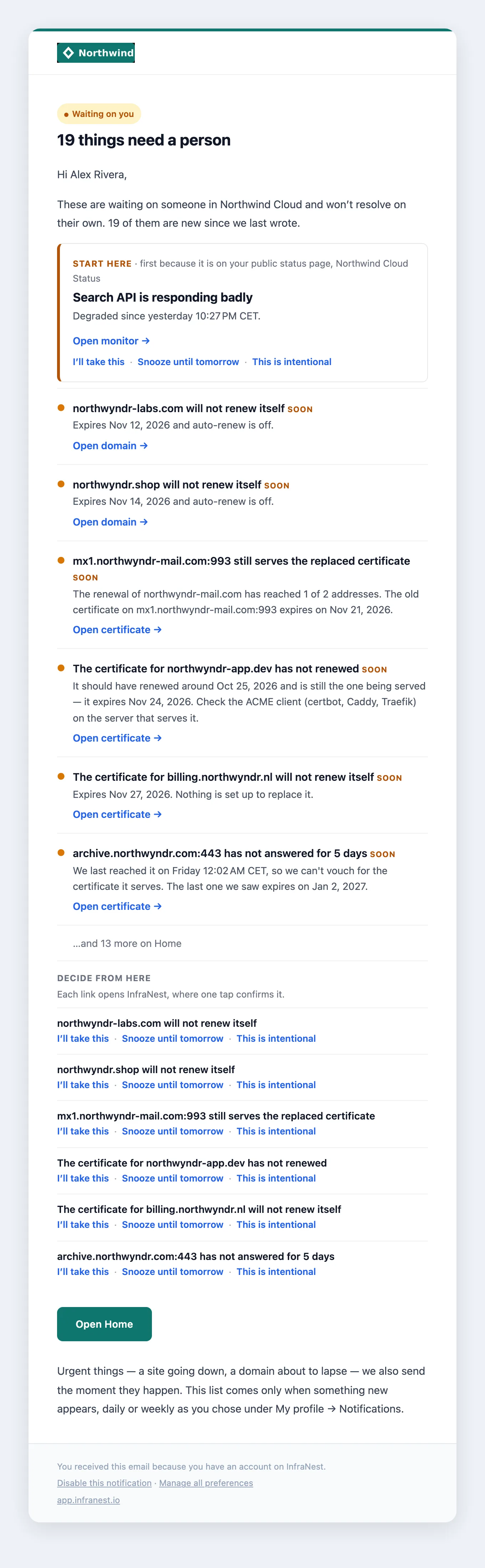
Each line says what's wrong and links straight to the fix, using the same words shown on Home. A red dot marked Urgent means something is down or about to lapse; an amber dot marked Soon means it needs action but there's time. The words are there so you can tell them apart without relying on colour.
When only part of the list is new to you, new items appear first under New since we last wrote, with the rest under Still waiting. The email names up to six things; if there are more, the last line tells you how many more are waiting on Home.
#Where to start
The top of the email shows Start here — the one thing to look at first, matching what Home puts first and why (for example, first because it is on your public status page). If a recent change likely caused it, such as a deploy shortly before a site went down, the email names that change too.
The subject line also names that first item, so you can judge from your inbox alone whether it can wait.
#Decide without opening the app
Each item has three links:
- I'll take this — your teammates see you've got it, and it leaves their list.
- Snooze until tomorrow — stops it counting as needing anyone until tomorrow morning.
- This is intentional — stops it counting until something changes, such as a new expiry date.
A link never changes anything by itself — it opens a short confirmation page in InfraNest, and one tap confirms it. If you're not signed in, you'll sign in first and land back on that page.
- If the item was already fixed or changed since the email was sent, the page says so and there's nothing to do.
- Snoozing and marking something intentional hide it for the whole team, so only owners and admins see those two links. Anyone can take something on.
- The links work for a week, and only for the person the email was sent to — a forwarded email's links won't work for someone else.
Everything you decide this way shows up in the Audit Log, exactly as when you decide on Home.
#When it arrives
At most once a day, in the morning in your workspace's time zone — at the hour your team chose, or an hour you pick yourself. You can instead choose once a week, on Monday.
On Mondays, if you also get the weekly summary by email, this list comes inside it rather than as a separate email.
Either way, it only arrives when something new to you has appeared:
- Nothing changed since the last one? No email.
- Fixed a couple of things but not all? No email — the list just got shorter.
- Something new went wrong? You get an updated list, with the new items at the top.
- Something keeps flickering on and off? It won't email you every morning about the same thing.
#Get it in Telegram instead
If you've linked your Telegram to InfraNest, your summary can come there instead of — or as well as — by email.
- Go to My account → Notifications.
- Under Everything else, next to when your summary arrives, choose Send it by: Email, Telegram or Both.
The Telegram message has the same list, at the same time, with an Open button for each item. It still only comes when something is new. If your Telegram doesn't get this workspace's notifications, or the bot can't reach you, the summary comes by email instead, so you never miss it.
Not linked yet? Use Add Telegram or Slack on the same page first.
NoteEveryone in the workspace gets their own copy of this email, on every plan, free included. If someone has said I'll take this about an item, only they keep seeing it — the rest of the team knows it's handled.
#Post it to Slack or Microsoft Teams
If your team plans its day in a Slack or Teams channel, the same list can be posted there too.
- Go to Integrations and open the Slack or Teams destination.
- Under What it hears, and when, find "Needs you" list.
- Choose Daily or Weekly, on Monday, and save.
The channel gets the same list as the email, in the same words, at the same time — and only when something new has appeared. It's the whole team's list: an item someone said I'll take this about is still shown, because the channel belongs to everyone. If the channel stops accepting messages, the list is emailed instead to the people who look after that destination, so it isn't lost.
#Choose how often, or turn it off
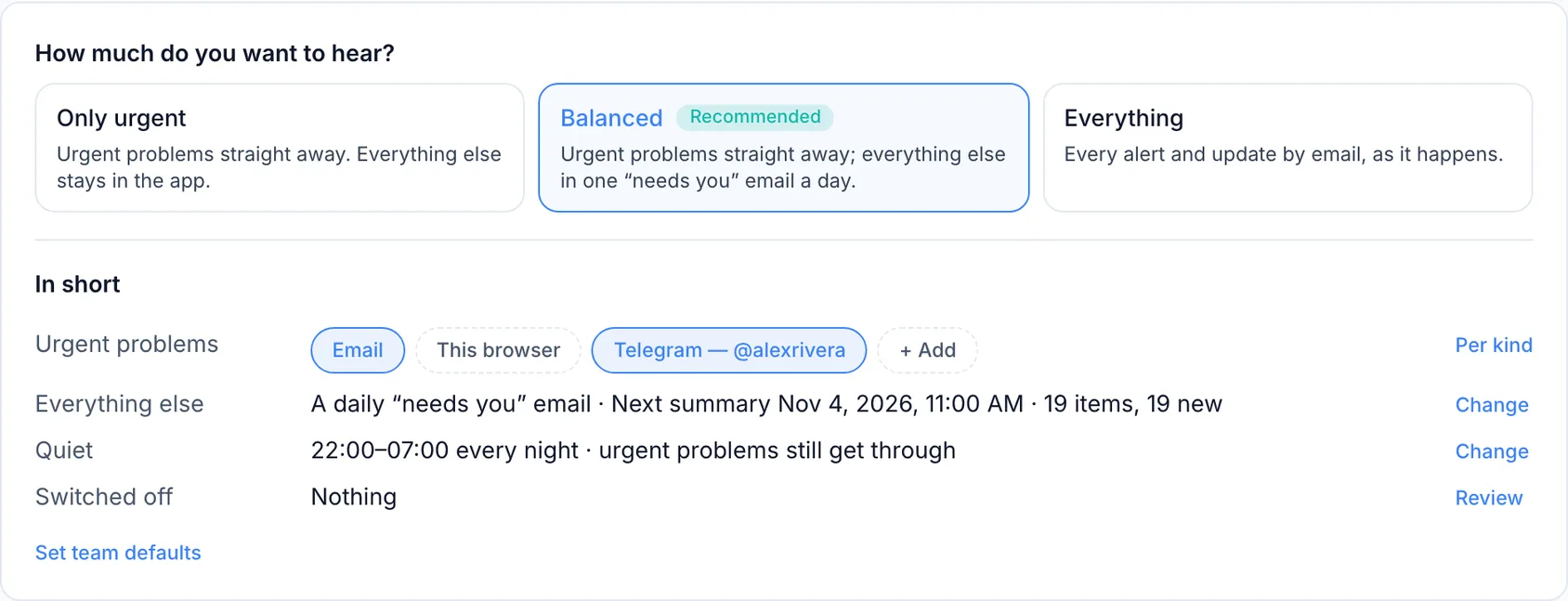
- Go to My account → Notifications.
- Under How problems reach you, find Everything else.
- Choose Daily or Weekly, on Monday — or Immediately to get each problem in its own email as it happens, or Off.
The unsubscribe link at the bottom of the email turns it off too. Either way, it only affects you — your colleagues keep getting theirs.
TipThis summary is only sent by email (and to Slack or Teams, if set up) — it doesn't add anything to the bell. Each problem still appears in the bell as it happens, and urgent problems are still emailed straight away. For finer control over which problems reach you and how, see Your notifications.
Was this article helpful?
Thanks for your feedback!
Thanks, this goes straight to the docs team.
Related articles
 SlackConnect SlackSend InfraNest alerts straight into a Slack channel, so your team sees incidents, expiries and status changes where they already work.