

Some costs never show up in InfraNest automatically — a licence, a support contract, a DNS plan billed per account rather than per zone. This article is for anyone who wants their spend totals to reflect what they actually pay, including those extra costs.
#Overview
- InfraNest tracks the costs it can see from your connected providers, but some costs live outside that — invoices, contracts, shared subscriptions.
- You can add these manually so your totals are complete and accurate.
- There are two kinds: costs tied to one specific item, and costs that cover your whole account.
#Add a cost for a single item
Use this when the cost belongs to one thing — a licence on a server, a trustee service on a domain, an extra on a volume.
- Open that item's detail page.
- Use + Add cost.
- The cost is counted with that item, so it appears under the right type, provider and tags.
#Add a cost that covers your whole account
Use this for things like a DNS plan priced per account rather than per zone, a support contract, or a monthly retainer — anything with no single item to attach it to.
- Go to the Spend page.
- Find "Paying for something that covers your whole account?"
- Use + Add cost there.
NoteAccount-level costs are never split across your items. A €20/month DNS plan covering forty zones is not shown as €0.50 per zone — it's counted once, under Account-level, and attributed to nothing. Splitting it would make your per-item figures shift every time you added or removed an item, and your reports wouldn't be reliable. These costs still count towards your grand total, shown as their own Account-level row.
#Record object storage costs
Object storage (Hetzner Object Storage, DigitalOcean Spaces) is billed per account, not per bucket — one subscription with allowances shared across every bucket you have.
- Go to the Spend page.
- Find "Paying for something that covers your whole account?"
- Use + Add cost and record the subscription amount, the same way as a DNS plan.
Splitting the cost per bucket would mean inventing a number, since there is no per-bucket price to split. InfraNest also doesn't list your buckets — both providers put object storage behind a separate key rather than the one you connected, and neither publishes how much you're storing. Check your provider's own console for that.
If you go over your allowance, record the overage as a usage-based charge instead — see below.
#Record usage-based charges
Per-query DNS billing, bandwidth overage, object storage above your allowance, backup storage above your allowance — InfraNest doesn't receive these numbers, so it won't estimate them for you.
- Wait until the charge has actually happened and you know the amount.
- Add it as a cost for that month, using the real figure (for example, "Route 53 queries, August — €3.20").
- Repeat each month rather than trying to project or average it in advance.
This keeps your totals as real money, correctly dated, instead of an estimate that drifts over time.
#Tips
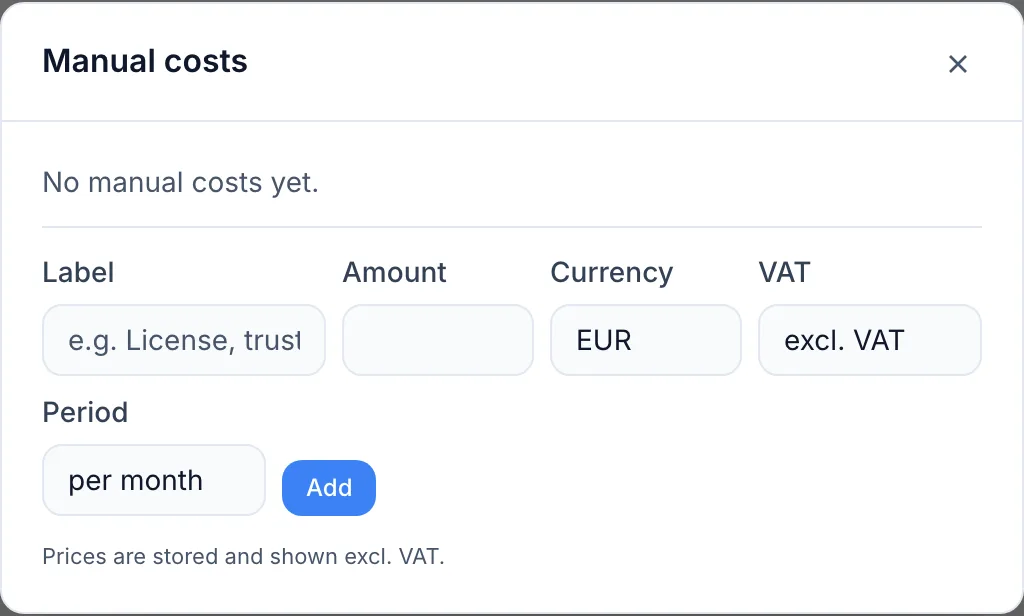
- Per month or per year — pick whichever matches how you're actually billed. Yearly amounts are divided out for the monthly view; the year figure stays exactly what you typed.
- Currency — any supported currency works. It's converted to your base currency for totals, using the European Central Bank rate.
- VAT — amounts are stored excluding VAT. If your invoice shows a gross figure, switch the toggle and the VAT is calculated for you.
TipKeep usage-based charges dated to the month they actually happened — this keeps historical reports from changing after the fact.
#Good to know
- Adding, changing or removing a cost is recorded in your Audit Log.
- Removing an item removes it from every total straight away. It doesn't rewrite history that's already been recorded.
- Reporting is part of a paid plan. If the page shows an upgrade prompt, that's why.
Was this article helpful?
Thanks for your feedback!
Thanks, this goes straight to the docs team.