

The Security Advisor is a built-in checklist that tells you, in plain language, whether each of your servers is set up safely — and lets you fix most problems with one click. It's for anyone managing servers who wants peace of mind without having to be a security expert.
#Overview
- Checks things like firewalls, backups, delete protection, monitoring, alerts, and pending updates
- Sorts issues by how urgent they are, and tells you exactly what to do about each one
- Works from your provider's settings alone, and sees even more once the InfraNest agent is installed
- The same checks appear consistently on the server's page, in your servers list, and on Home
#Run the Security Advisor
- Open a server. The Protection card on the right of its overview shows one line for each thing that protects it — firewall, backups, delete protection, monitoring, alerts, and updates and reboots. Each line starts with a one-word state (On, Off or Not checked — for mail blocklists, Clean or Listed; for updates, Up to date or Waiting), followed by detail such as "On · daily at 03:00" or "Not checked · needs the agent." A dot repeats the state: green for passed, red or orange when it needs you, grey when it couldn't be checked. Where a line needs attention, the detail text is a link straight to the fix.
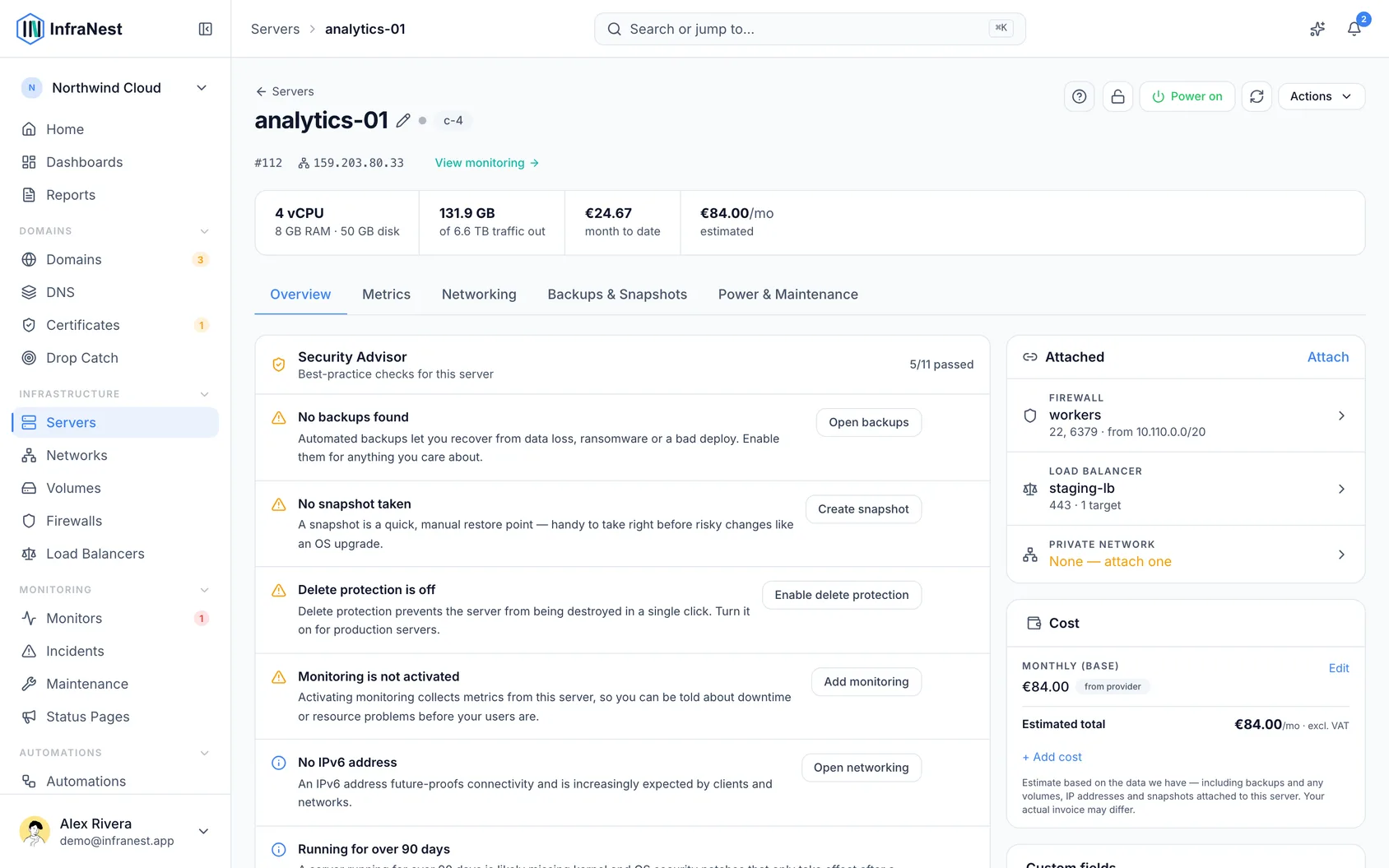
- Anything that is open or broken right now — an exposed port, no firewall, backups switched off, a reboot waiting to apply updates — also shows as a card on the left, under What runs here. Each card explains what's wrong, what to do, and what was seen. Its button jumps straight to the fix.
- Click See all checks at the bottom of the Protection card to see everything: recommendations with their own fix buttons, checks that need the agent, and checks that passed.
- If a check doesn't apply to a server, you can ignore it there. It then stops counting everywhere — on the server, in the servers list, and on Home.
#What it checks
- Needs you — no firewall; SSH open to the world; a database port exposed publicly; remote desktop (RDP) open to the world; a port reachable without need; the server's address on a mail blocklist; backups switched off; a reboot waiting to apply installed updates.
- Recommendations — no snapshot; delete protection off; monitoring not activated; no alert rule watching the server; no IPv6; the server has been up for over 90 days; no private network; unattached volumes in your account.
The servers list, the server's page, and Home all use the same checks, so they always agree. An exposed port, a missing firewall, or an open database also shows up on Home, where you can snooze it or mark it as intentional.
NoteA snooze or "intentional" mark only covers the exact exposure you made it about — that firewall, that port, that service. If a different one opens later, it shows up as new rather than staying hidden.
#Backups
"Backups switched off" is judged from what your provider tells InfraNest during a sync: Hetzner and DigitalOcean report a backup window, OVHcloud its automated backup, and TransIP whether the backup add-on is active. If a provider doesn't answer during a sync, the check is left out rather than reported as off.
#Some checks need the agent
Your cloud provider sees a server only from the outside — it can't tell whether updates are waiting for a reboot, or when the server last restarted. Without the agent, those checks are listed as Needs the agent instead of being guessed. Install the agent and they're filled in within a minute.
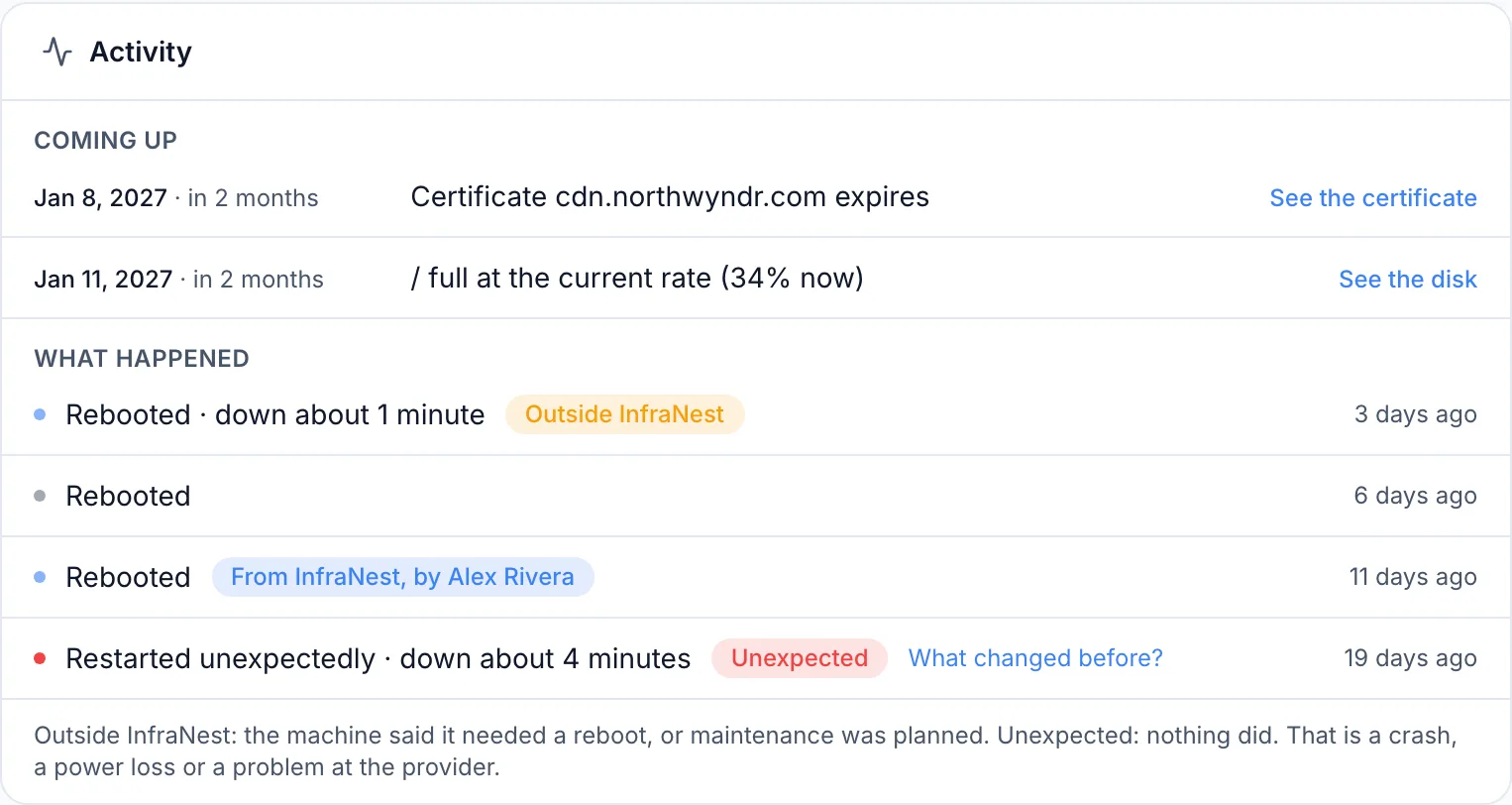
With the agent, the uptime and reboot checks also show restart history: how many unexpected restarts happened in the last 30 days, and when and why the server last restarted — from InfraNest, by an automation, outside InfraNest, or unexpectedly.
#How the server itself is set up
With the agent installed on a Linux server, the System tab shows how the server itself is configured. The agent reads settings from files any user can read — it never runs as root and changes nothing. InfraNest checks five things:
- SSH accepts passwords — and whether the whole internet can reach SSH, and whether anything (such as fail2ban or CrowdSec) slows down repeated guesses. All three true is a warning; only some true is a note. A port given only in a
ListenAddressline isn't read, and the note says so. If you've let the agent read the system log, the check also reports how many failed login attempts occurred in the last 24 hours — just the number, never who tried or from where. - Root can log in over SSH — flagged when password login is allowed for root; key-only login is fine.
- A new administrator — someone added to the sudo, wheel or admin group since the agent's first reading. If it was you, click That was us to record it and clear the warning.
- Nothing backs up this server — provider backups are off, and the agent sees no backup software and no backup-like scheduled job. Marked likely, not certain — say so if you back up another way.
- Security updates are not installed automatically — unattended-upgrades or dnf-automatic is off or missing. A warning when updates are waiting, otherwise a recommendation.
Each card explains how we know — the exact setting, file and line — and gives the fix as a command you run on the server, with a copy button and a link to your distribution's documentation.
WarningBefore switching off SSH password login, confirm you can log in with a key — otherwise you risk locking yourself out.
When a setting can't be read because its file needs root access, the row says so plainly, with the command that shows it and a Copy the command button — that command only prints settings, it changes nothing.
Further down, Security and setup summarises how many things were checked and are fine, how many the agent can't read, and how many it never reads without root. Click Show the checks to see both lists.
These checks need agent v0.21.0 or later, and run on Linux only; on Windows the section says it is not read.
#Is the server's address on a mail blocklist?
If spam was ever sent from your server's address, mail servers may refuse its mail or send it to spam — a common reason contact-form or order emails "never arrive." InfraNest checks every server's public IPv4 address against two free mail blocklists, SpamCop and PSBL: a new server within a minute of being added, then daily on paid plans and weekly on the Free plan.
The server's Protection card always shows the result on its Mail blocklists line: Clean, with when it was last checked, or Listed, naming the list.
When listed, you'll see Address is on a mail blocklist on the server's page and on Home. The card names each list and links to its page, where you can look up the address and request removal.
What to do:
- A new server — providers reuse addresses, so ask for a different one now, before anything depends on this one.
- A server you've had a while — something on it likely sent spam. Find and stop it, then request removal. Asking before it's fixed just gets it listed again.
You'll also get one alert when the address is listed, and one when it's removed, plus matching automation triggers. Use Check again under the Mail blocklists line to re-check right away, once a day per server. The finding clears by itself once the list no longer names the address.
#See what the internet can really reach
A firewall rule only says a port may be reached. With the agent installed, InfraNest also sees which ports the server actually listens on, and how many addresses connect — public, private, or the server itself. Together these tell you more than either alone:
- Open for nothing — a rule opens a port and nothing listens behind it. Remove the rule.
- Only private addresses use it — the whole internet may reach the port, but only your own network connects. Limit the rule to your private network or a dynamic IP.
- No firewall in front — something meant to be internal listens on every address with no firewall. Make it listen on
localhostor a private address, or add a firewall. - Open to everyone — a database, remote desktop or SSH that anyone can reach and that is listening.
The server's Overview shows these problems under Reachable from the internet, as a table of each port, what the firewall allows, what's listening, and the verdict. All ports on Networking opens the full list. A problem port has its fix right there, such as Limit to Office or Remove the rule in web-default — recorded in the audit log.
#Is a database reachable from the internet?
Databases and caches open to the whole internet are a common way small servers get taken over. With the agent installed, InfraNest warns you when three things agree, shown under How we know:
- What listens — a database or cache listens on a public address or every address.
- Nothing stops anyone — a firewall rule allows everyone, or no firewall is attached.
- A public address — the server has an internet-reachable address.
The card says how sure it is: Certain when InfraNest reads both the firewall and what listens; Very likely when it can't read your provider's firewall (a server-level firewall might still close the port).
To fix it, make the database listen on localhost or a private network only, or limit the firewall rule. Close it in the firewall opens the firewall to change. On Windows, the agent doesn't read listening ports, so this warning never appears there.
#A port that started listening this week
When something starts listening on a new port, InfraNest tells you — on the server's Workloads tab, on its Overview when everyone can reach it, and on Home. In the ports table on Networking, the port is marked New.
The card shows when it was first seen and what happened just before (a deploy, a service starting, a restart), and who can reach it: everyone, some addresses, only the private network, or nobody from outside. A port everyone can reach has a coloured border; a database open to everyone has a red one.
Click Expected if you meant to open the port — InfraNest remembers this for that server and port. Show details reveals what each source saw. Expected is recorded in the audit log and can be undone on Home.
What counts as new:
- Only ports that started listening after the agent's first reading
- A port that stopped and came back within the week isn't new
- Ports reachable only from
localhostare excluded - A port stops being new a week after it was first seen
NoteThe agent can't always tell which program holds a port, or see ports that Docker publishes without a process listening on the server itself — those are shown as Cannot tell rather than flagged as a problem.
#Monitoring and alert rules are two separate checks
- Monitoring not activated — nothing is collecting metrics yet. The fix opens the server's monitoring page to activate it and install the agent.
- No alert rule is watching this server — metrics are flowing, but nothing tells you when something goes wrong. The fix opens Alert rules.
The alert-rule check only appears once monitoring is on, and a rule that's switched off doesn't count towards it.
TipIf you're just getting started, set alert rule defaults once for your workspace — every server, including ones you add later, inherits them automatically.
Was this article helpful?
Thanks for your feedback!
Thanks, this goes straight to the docs team.