

API tokens let you connect InfraNest to scripts, tools and AI assistants so you can automate tasks you'd otherwise do by hand in the app. This article is for anyone who wants to use InfraNest's API.
#Overview
- A token lets outside tools act on your workspace through InfraNest's API.
- Each token only has the abilities you give it, so you can limit what it can touch.
- Tokens can be limited to specific addresses, given an expiry date, and revoked at any time.
- Some account-level actions always require you to be signed in — a token can never do them.
#Create a token
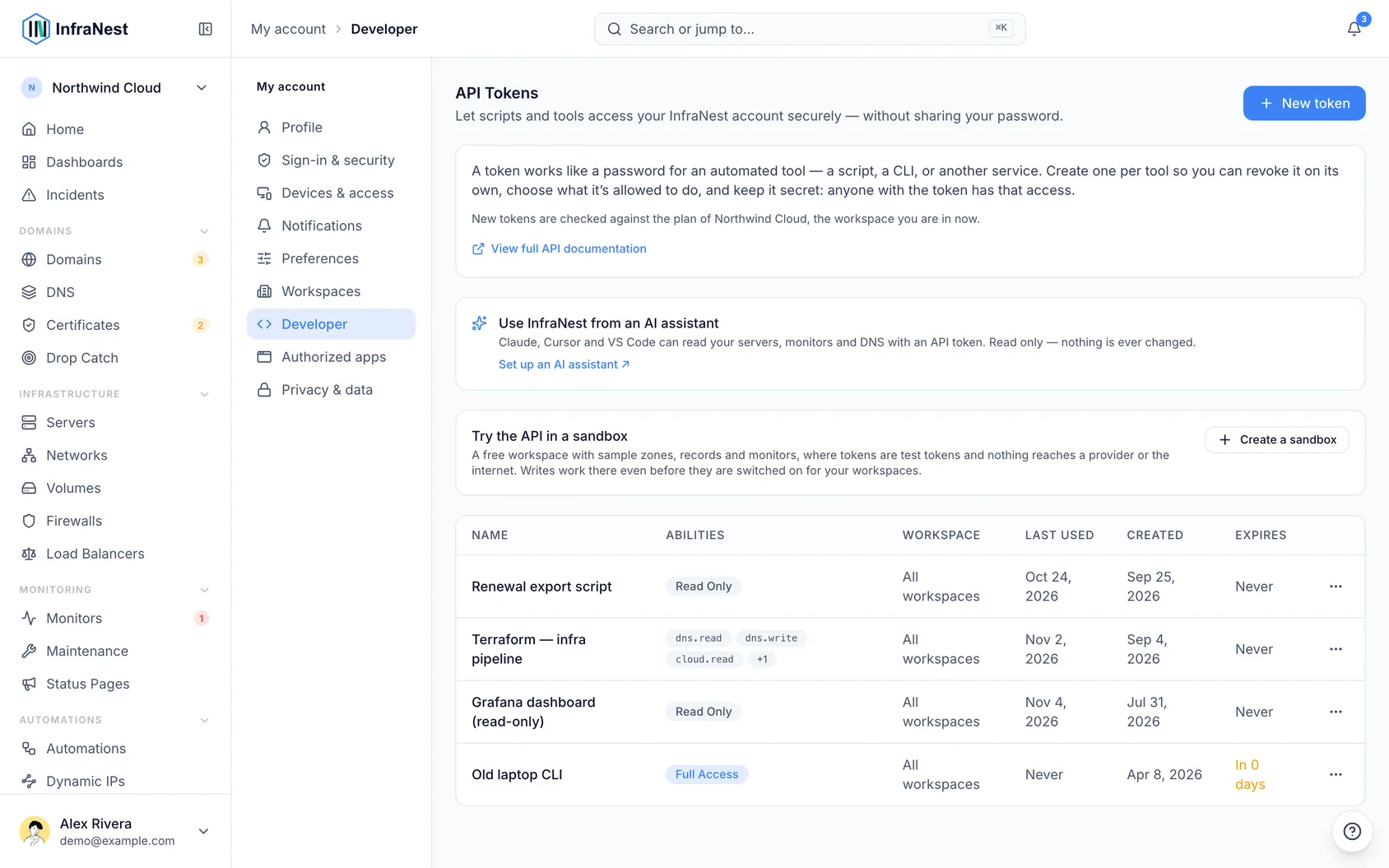
- Go to My account → Developer and choose New token. The token belongs to you, and it works in the workspace you're in when you create it.
- Give it a name and choose its abilities (what it can do). Tick Works in all my workspaces only if a tool genuinely needs access to every workspace you belong to.
- Copy the token now — it's shown only once. Afterwards you'll only see a hint of its last few characters.
#Abilities
Abilities are granular — read or write per area — plus a read-only preset and full access. Give a token only what it needs.
Each area covers more than its name alone suggests:
| Area | What the token can touch |
|---|---|
| Domains & Contacts | Domains, contacts, transfers, nameservers |
| DNS | Zones, records, templates |
| Cloud Infrastructure | Servers, volumes, snapshots, networks, firewalls, load balancers, cloud credentials |
| Monitoring | Uptime checks, incidents, maintenance, status pages, certificates, webhooks, automations, integrations, tags |
| Drop Catch | Watched domains and drop-catch attempts |
| Members & Teams | Members, invitations, roles, single sign-on |
| Billing | Subscription, invoices, payment methods, billing details — read only |
| Audit Log | Your workspace's audit log — read only |
| Data export & import | Exporting your data, and importing from CSV |
Certificates and webhooks are part of Monitoring rather than areas of their own — a token that needs either one needs Monitoring. Billing and the audit log are read-only over the API however the token is scoped: changing a subscription or paying an invoice is something only a person signed in to the app can do.
#What a token can't do
A token works with your infrastructure. It can't change your account, even with full access, and it can't read settings that belong to people or that are themselves a key: single sign-on, notification settings, saved payment details, and webhook addresses. Creating or revoking tokens, changing your email or password, two-factor and passkeys, deleting your account, and connecting Telegram, Slack or browser notifications all need you signed in to the app. That way a token that leaks can't be used to lock you out or give someone a way back in.
NoteA few names are reserved for InfraNest's own use, such as
api. If you pick one, you'll be asked to choose another.
#Limit a token to your addresses
- If a token is used from somewhere with a fixed address, like a CI runner or a server, you can make it work from there only.
- Under Allowed addresses, enter one IP address or range per line, such as
203.0.113.10or203.0.113.0/24. From any other address the token is refused, so a copy that leaks is useless. Leave it empty to allow any address. - To change the list later, open the token's menu and select Limit addresses. Clearing the list allows any address again.
#Manage tokens
- See when each token was last used and when it expires, and revoke any token at any time.
- When you create a token, choose how long it lasts: 30, 90, 180 or 365 days (90 unless you pick another). We email you a week before it expires.
- To keep it working, open the token's menu and select Renew for 90 days. The token stays the same, so you don't have to update anything that uses it.
Tokens made before tokens had an expiry date show Never. Once one is six months old, we'll email you once to suggest renewing it, which gives it an expiry date.
TipThe full endpoint reference is in the app — select View full API documentation under My account → Developer.
#Stay informed
- A new token is announced. When a token is created on your account, we email you, just as when a passkey is added. If it wasn't you, revoke it and change your password.
- Unusual activity is flagged. If a token suddenly makes far more changes than it usually does, your workspace's owners get a notification and it shows under Needs you on Home. That is usually a script gone wrong, or a token someone else has got hold of.
- See what a token did with View activity in the token's menu: the audit log, filtered to that token.
#Try it in a sandbox
Select Create a sandbox under My account → Developer for a free practice workspace with sample data, where tokens are test tokens and nothing reaches the outside world.
#Use it from an AI assistant
Claude, ChatGPT, Cursor and VS Code can read your InfraNest account through our MCP server — ask "which monitors were down last night?" and they look it up. Claude and ChatGPT connect without a token. Cursor and VS Code use an API token; give it read access only to what the assistant should see. With read access only, the assistant can only read. With Monitoring write access it can also acknowledge incidents, leave notes, silence monitors, re-run a monitor's check and run maintenance windows — never anything else — and it never sees secrets such as domain transfer codes.
#Rate limits
Each token can make up to 300 requests a minute, and up to 60 of those can be changes (creating, editing or deleting something). Changes are also limited to 1,000 an hour, so a script that runs all day cannot change everything by accident. Your plan may set different numbers. If a token goes over, it gets a "try again shortly" response saying how many seconds to wait. Reads keep working when only the changes limit is reached, and one token's limit never slows down another.
Some actions also have their own limit per workspace to protect the platform, like manual syncs and "check now".
Was this article helpful?
Thanks for your feedback!
Thanks, this goes straight to the docs team.