

Control exactly which PagerDuty service gets paged for each alert, whether incidents close themselves, what shows up in PagerDuty's history, and what happens during planned maintenance. This is for anyone who manages how InfraNest and PagerDuty work together, on a per-service basis.
Overview
- Every setting here is per PagerDuty service, found under Integrations → PagerDuty.
- InfraNest sends details with every page so PagerDuty's Event Orchestration can route it automatically, without relying on the title.
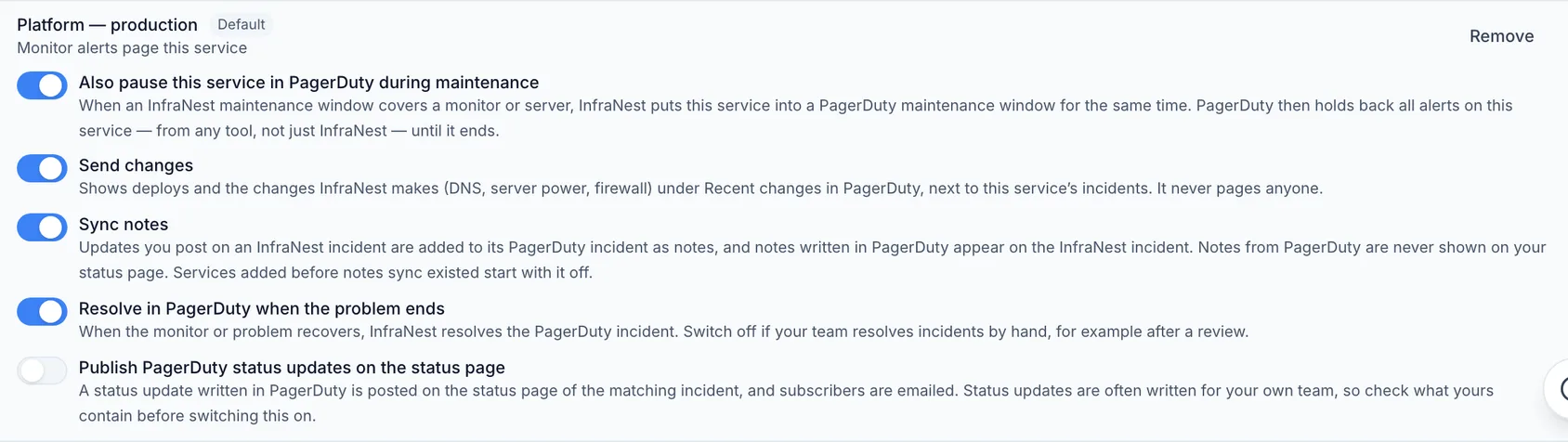
- You control whether incidents resolve automatically, whether changes like deploys show up in PagerDuty, and whether maintenance windows pause PagerDuty too.
Send alerts to the right team
Each page InfraNest sends includes details PagerDuty can match on:
- Component — for a monitor, its name; for other alerts, the domain, server, certificate or DNS zone.
- Group — for a monitor, its first tag (or "monitoring" if it has none); for other alerts, the area, such as domains, certificates, servers, dns or drop-catch.
- Class — for a monitor, the check type, such as http, ssl or ping; for other alerts, the kind of alert, such as domain_expiry_critical.
For example, to send everything about your databases to the database team:
- In InfraNest, tag your database monitors "database".
- In PagerDuty, open the service's Event Orchestration (or the global one, to route across services).
- Add a rule where group matches "database", and route it to the database team's service.
- Take a database monitor down to try it — the incident should open on the database team's service.
You can also set component, group and class yourself in the Trigger PagerDuty incident automation action.
Route on your own fields and set the incident type
Pages also carry extra details you can route on:
- impact and source — how serious InfraNest rates the alert, and what raised it.
- fields — your own custom fields on whatever the page is about: for a monitor, the server it watches; for a domain, certificate or server alert, that record's own fields.
So a Customer field you keep on your servers can route pages: in Event Orchestration, add a rule on the alert's custom details, such as fields.Customer matches "Acme", routing to Acme's service. The same kind of rule can set the incident type — for example, impact matches "critical" routes to a Major incident. Nothing needs setting up in InfraNest for this.
Resolve incidents by hand
By default, InfraNest resolves the PagerDuty incident as soon as the problem ends. If your team prefers to close incidents itself, for example after a review:
- Go to Integrations → PagerDuty and find the service.
- Turn off Resolve in PagerDuty when the problem ends.
The InfraNest incident still closes when the problem ends. The PagerDuty incident stays open until someone resolves it, either in PagerDuty or by resolving the incident in InfraNest. Acknowledgements keep syncing either way.
NoteDomains and certificates resolve when InfraNest actually sees the fix — a renewed domain at its next registrar sync (or straight away if renewed in InfraNest), a replaced certificate when InfraNest sees the new one. Good news, such as a renewal, never opens an incident in the first place.
See InfraNest changes in PagerDuty
PagerDuty shows recent changes on every service and incident. With Send changes turned on, InfraNest fills this in, so a responder can see that a deploy went out four minutes before a monitor went down. Changes never open an incident or page anyone.
What appears:
- Deploys of a repository you linked to a monitor or server, on services that get monitor alerts.
- DNS changes, server power actions, firewall changes made through InfraNest, and replaced certificates — shown on every service on the account, since they aren't tied to one monitor.
Several changes to the same zone, server or firewall within about a minute arrive as a single entry, such as "3 DNS changes to example.com by Dana." Send changes is on by default for every new service; you can turn it off per service. PagerDuty keeps changes for 90 days.
Pause PagerDuty during maintenance
An InfraNest maintenance window quiets InfraNest's own alerts, but other tools paging the same PagerDuty service still get through. To quiet those too:
- Go to Integrations → PagerDuty. This needs an account connected with one click.
- Under the service, switch on Also pause this service in PagerDuty during maintenance.
- Schedule maintenance as usual under Monitoring → Maintenance, covering at least one monitor or server, with alerts held back.
InfraNest then creates a matching PagerDuty maintenance window, moves it if you change the times, and removes it when you cancel or finish early. Repeating maintenance gets one window at a time, for the next occurrence.
WarningWhile the window is open, PagerDuty holds back every alert on that service, from any tool, not just InfraNest's. Only switch this on where that's what you want. InfraNest never touches maintenance windows you made yourself in PagerDuty.
Escalation in InfraNest and in PagerDuty
InfraNest can push an outage nobody has acknowledged to your browser after 15, 30 or 60 minutes, under My account → Notifications. PagerDuty's escalation policies already do this, so you may not need both. Acknowledging in PagerDuty stops InfraNest's escalation too.
Troubleshooting
Deploys or changes don't appear under recent changes. Check that Send changes is on and the account isn't paused. A deploy only appears if its repository is linked to a monitor or server, the service gets monitor alerts, and InfraNest heard about the deploy within an hour.
PagerDuty didn't pause a service during maintenance. Check the switch, that the account isn't paused, and that the maintenance covers a monitor or server and holds alerts back. If PagerDuty refused, InfraNest tells you in the notification bell.
A domain or certificate incident stayed open after I renewed it. InfraNest resolves it once it sees the new expiry date. If you replaced it some other way, resolve it in PagerDuty.
A service has an integration called "InfraNest (setting up …)". That's InfraNest's own integration, before its rename. If PagerDuty didn't accept the rename, it still works — rename it yourself or leave it as is.
Was this article helpful?